Let’s Build Something Great
Tell us about your goals and request a free project estimate.


p=reject or p=quarantine). The vast majority remain vulnerable to spoofing and impersonation attacks.p=none to collect data. Monitor for 30‑60 days before moving to enforcement. Identify all legitimate sending sources first.p=reject for full protection. Once properly configured, DMARC p=reject blocks all unauthenticated emails, preventing spoofing entirely.Email authentication is no longer optional. Major mailbox providers enforce authentication standards at SMTP level, and domains without proper protection remain vulnerable to impersonation attacks. This guide explains SPF, DKIM, and DMARC-how they work individually, how they work together, and how to implement them correctly.
SMTP, the protocol that powers email, was designed in an era when security was not a primary concern. It lacks built‑in authentication, meaning anyone with a mail server can send an email claiming to be from your domain.
The technical distinction is critical:
Attackers exploit this gap. They send emails with a legitimate‑looking header From address while using a different Return‑Path. Without proper authentication, receiving servers cannot tell the difference.
Attacker → SMTP server → email with spoofed From: yourdomain.com| Impact | Detail |
|---|---|
| Financial losses | BEC scams accounted for 3.046 € billion in reported losses in 2025** across 24,768 incidents-an average of **123,000 € per case. AI‑assisted BEC scams cost businesses over 30 € million in 2025 alone. |
| Brand reputation damage | When customers receive spoofed emails that appear to come from you, your brand’s trustworthiness suffers. |
| Customer trust erosion | Phishing attacks using your domain erode the trust you have built with your customers and partners. |
| Deliverability problems | Without proper authentication, your legitimate emails are more likely to be flagged as spam or rejected outright. |
| Protocol | What It Does | How It Works |
|---|---|---|
| SPF | Authorises sending IPs | DNS TXT record listing IP addresses |
| DKIM | Cryptographic signing | DNS TXT record with public key |
| DMARC | Policy enforcement | DNS TXT record with policy and reporting |
SPF tells receiving mail servers which IP addresses are authorised to send email on behalf of your domain. When a server receives an email, it checks the Return‑Path domain against the SPF record published in DNS.
v=spf1 ip4:192.0.2.0/24 include:_spf.google.com ~all| Component | Meaning |
|---|---|
v=spf1 | Version identifier |
ip4:192.0.2.0/24 | Authorised IPv4 range |
include:_spf.google.com | Include Google’s SPF record |
~all | Soft fail (other sending is not explicitly authorised) |
| Mechanism | Meaning | Recommendation |
|---|---|---|
+ (pass) | Explicitly authorised | Default |
? (neutral) | No statement | Avoid |
~ (soft fail) | Not authorised but accept | Recommended initial setting |
- (hard fail) | Not authorised, reject | Final setting after verification |
DKIM adds a digital signature to each outgoing email. The sending server signs the email using a private key, and the receiving server retrieves the corresponding public key from DNS to verify the signature.

v=DKIM1; k=rsa; p=MIGfMA0GCSqGSIb3DQEBAQUAA4GNADCBiQKBgQC...| Component | Meaning |
|---|---|
v=DKIM1 | Version |
k=rsa | Key type (RSA) |
p=... | Public key (base64 encoded) |
DKIM-Signature: v=1; a=rsa-sha256; c=relaxed/relaxed; d=example.com;
 s=selector1; t=1690000000; bh=...; h=from:to:subject;
b=...| Header Field | Meaning |
|---|---|
v=1 | DKIM version |
a=rsa-sha256 | Signing algorithm |
d=example.com | Signing domain |
s=selector1 | Selector (points to DNS record) |
bh= | Body hash |
h= | Headers included in signature |
b= | Digital signature |
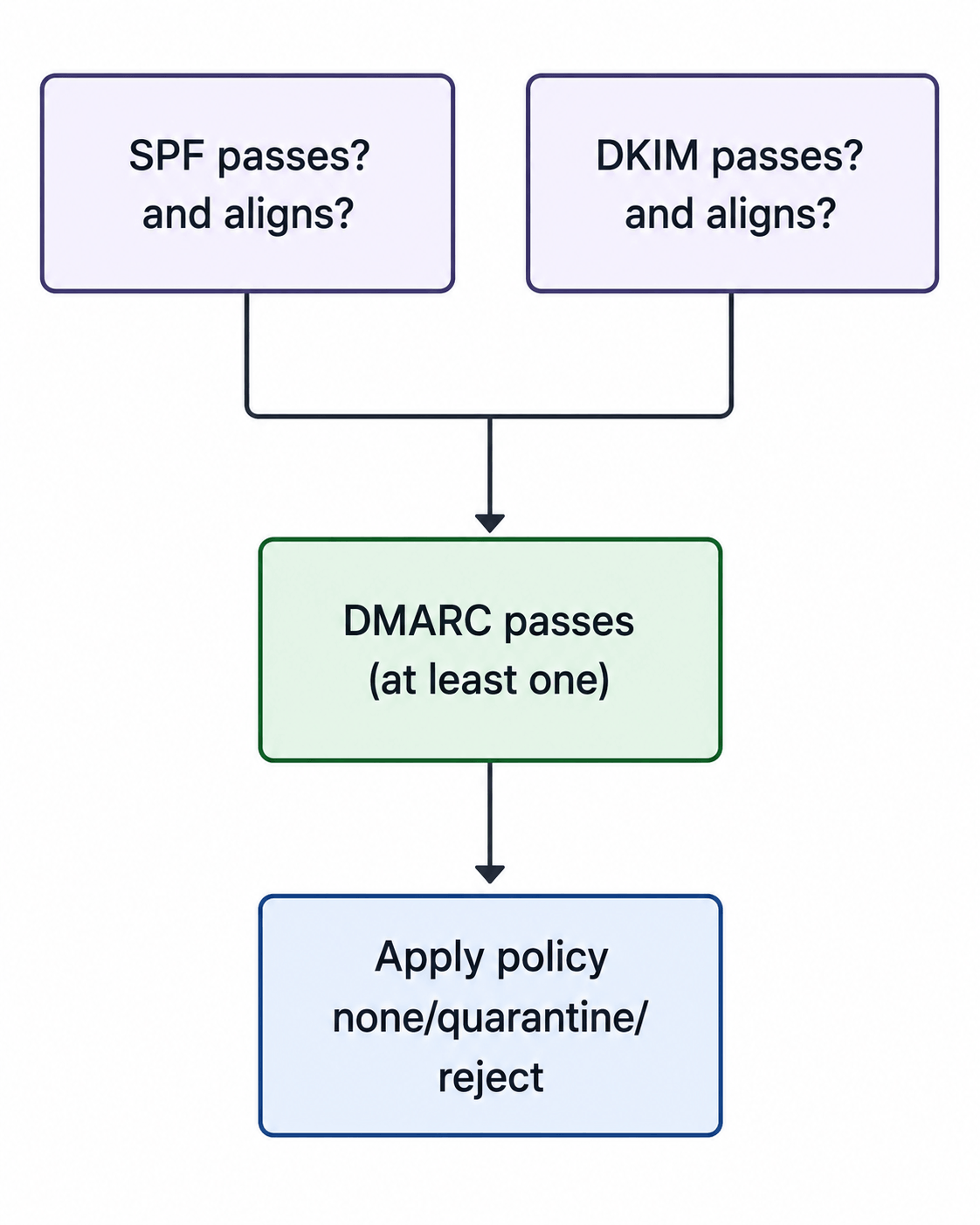
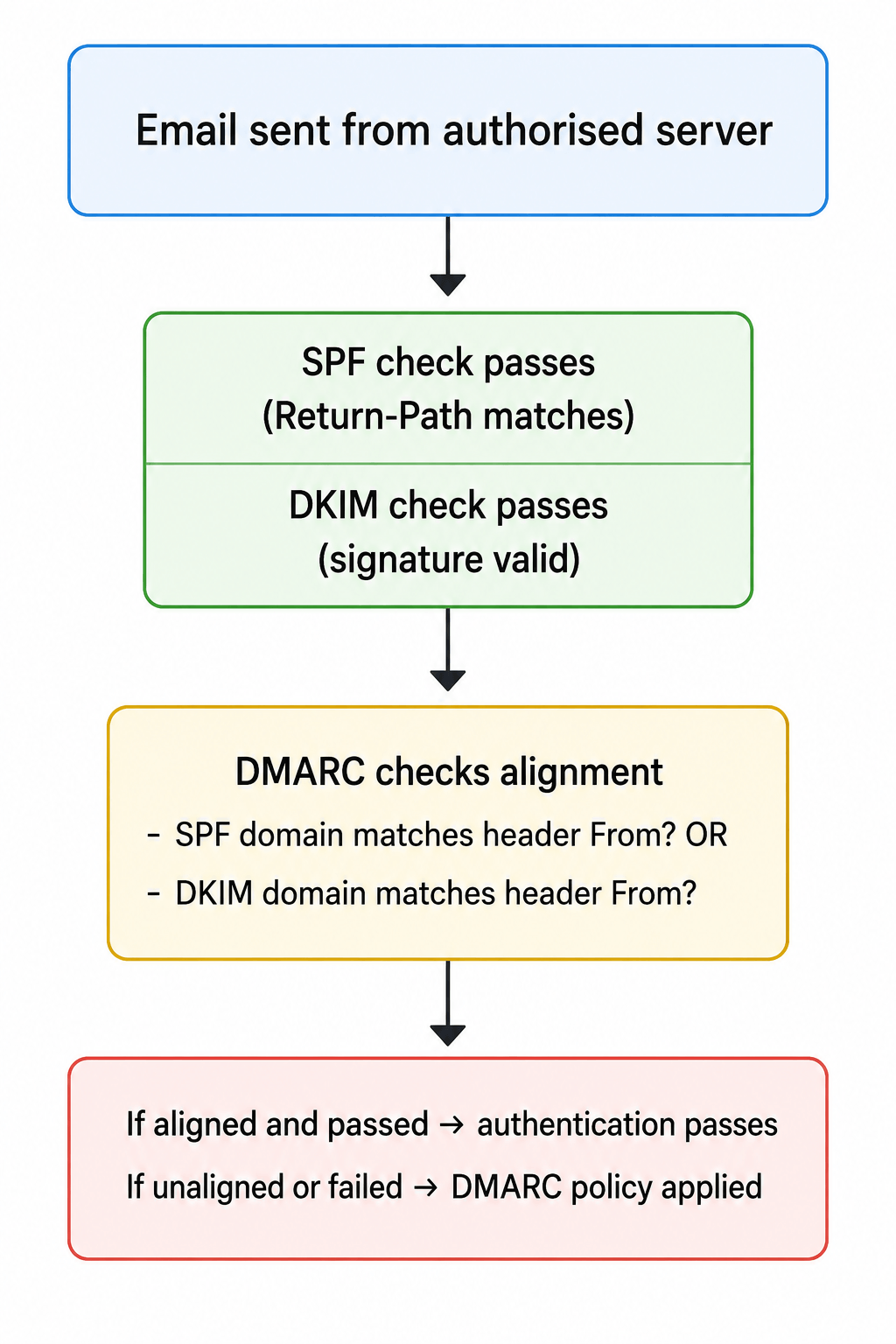
DMARC verifies that either SPF or DKIM passes and that the domain in the header From aligns with the domain in the authenticated identifier.
Alignment requirements:
d=) must match the domain in the header From.| Policy | Effect | Risk |
|---|---|---|
p=none | Monitor only – reports sent, no action | No protection, only visibility |
p=quarantine | Flag suspicious emails (spam folder) | Some protection, limited enforcement |
p=reject | Block all unauthenticated emails | Full protection, risk of blocking legitimate email if misconfigured |
v=DMARC1; p=reject; rua=mailto:dmarc-reports@example.com; ruf=mailto:dmarc-forensic@example.com; pct=100| Field | Meaning |
|---|---|
v=DMARC1 | Version |
p=reject | Policy (none/quarantine/reject) |
rua=mailto:... | Aggregate report destination |
ruf=mailto:... | Forensic report destination |
pct=100 | Percentage of messages subject to the policy |
| Scenario | SPF | DKIM | DMARC | Result |
|---|---|---|---|---|
| Legitimate email from your server | Pass | Pass | Pass | Delivered |
| Spoofed email from unauthorised server | Fail | Fail | Fail | Blocked (with p=reject) |
| Forwarded email (SPF fails, DKIM passes) | Fail | Pass | Pass (if DKIM aligns) | Delivered |
| Mistake | Why It’s a Problem | Fix |
|---|---|---|
| SPF includes too many lookups | Exceeds 10 DNS lookup limit; SPF will permanently fail | Consolidate includes, use flattening services |
| Using ~all (softfail) instead of -all | Gives attackers a way to still pass | Use -all once fully implemented |
| Missing alignment (DMARC) | SPF/DKIM pass but don’t align with header From | Configure both to use the same domain |
| DMARC p=none indefinitely | No enforcement – attackers still succeed | Move to p=quarantine then p=reject |
| Not using subdomain policies | Attackers can spoof subdomains | Set sp=reject for subdomains |
| Not monitoring reports | No visibility into who is sending using your domain | Set up RUA and RUF reporting |
In February 2024, Google and Yahoo introduced mandatory authentication standards for bulk email senders (over 5,000 messages per day). Microsoft followed in early 2025. In late 2025, Gmail began strict SMTP‑level enforcement.
In 2026, non‑compliant messages are rejected at SMTP level.
This affects:
~all first, then move to -allp=none to collect datap=quarantine after verifying all legitimate sources are authenticatedp=reject after 90+ days of no issuespct=100 and configure sp=reject for subdomains| Tool | Purpose |
|---|---|
| MXToolbox | SPF, DKIM, DMARC record lookup |
| dmarcian DMARC Check | Complete DMARC validation |
| Google Admin Toolbox | Email header analyser |
| DMARC Analyzer | Monitor DMARC reports |
# Check SPF
dig TXT example.com | grep spf
# Check DKIM
dig TXT selector1._domainkey.example.com
# Check DMARC
dig TXT _dmarc.example.comAuthentication-Results: spf=pass smtp.mailfrom=example.com;
dkim=pass header.d=example.com;
dmarc=pass header.from=example.comSPF: pass
DKIM: pass
DMARC: pass (header.from matches authenticated domain)BIMI (Brand Indicators for Message Identification) displays brand logos in supported email clients (Gmail, Yahoo, Apple Mail).
Requirements:
p=quarantine or p=reject)Implementation:
default._bimi.example.com TXT
"v=BIMI1; l=https://example.com/logo.svg; a=https://example.com/vmc.pem"
BIMI builds on DMARC and provides visual verification for recipients, adding a layer of brand trust and recognition.
Email authentication through SPF, DKIM, and DMARC is a business necessity in 2026. The threat landscape has shifted-major mailbox providers enforce authentication standards, and non‑compliant messages are rejected before they reach recipients.
The three protocols work together as a system. SPF tells receiving servers which IPs are authorised to send. DKIM provides cryptographic verification that a message has not been tampered with. DMARC connects them, defines enforcement policies, and provides reporting on who is sending email using your domain.
Implementation follows a clear progression: start with SPF, add DKIM, then deploy DMARC in monitoring mode. After verifying all legitimate sending sources, move to enforcement with p=quarantine, then p=reject. BIMI can then be added for visual brand recognition.
The cost of non‑compliance is significant: BEC losses approach 3 € billion annually, and domains without protection remain vulnerable to impersonation attacks. By implementing SPF, DKIM, and DMARC, you protect your brand, your customers, and your business.
Need help setting up email authentication for your domain? Playful Sparkle has been engineering digital products since 2004, offering Web Development, App Development, and security consulting services. Our team can help you configure SPF, DKIM, DMARC, and BIMI for your domain. Contact us to discuss how we can help you secure your email.



Learn how eight compromised eMudhra private keys put website trust at risk, which systems may be affected, and what businesses, developers, and users should do.

Facebook introduced link-sharing limits for selected Pages in 2026. Learn how the restrictions affect businesses and how your website, email subscribers, and other channels can help you find customers beyond Facebook.

On October 21, 2026, two critical PHP vulnerabilities, CVE-2026-109618 and CVE-2026-109619, were disclosed, enabling potential unauthenticated remote code execution. Learn which PHP versions are affected, how the flaws impact WordPress and other websites, and how to secure your servers.

