Let’s Build Something Great
Tell us about your goals and request a free project estimate.


DKIM (DomainKeys Identified Mail) is a domain-level email authentication framework defined by RFC 6376 (published in 2011, with RFC 8301 updating cryptographic requirements in 2018). It uses public-key cryptography to bind an email’s content and critical headers to a domain identity.
The problem DKIM solves: Email can be tampered with in transit-headers can be altered, content can be modified, and senders can be spoofed. DKIM provides a way for receiving servers to verify that an email claiming to come from your domain actually did, and that it hasn’t been changed since it was signed.
How DKIM differs from SPF:
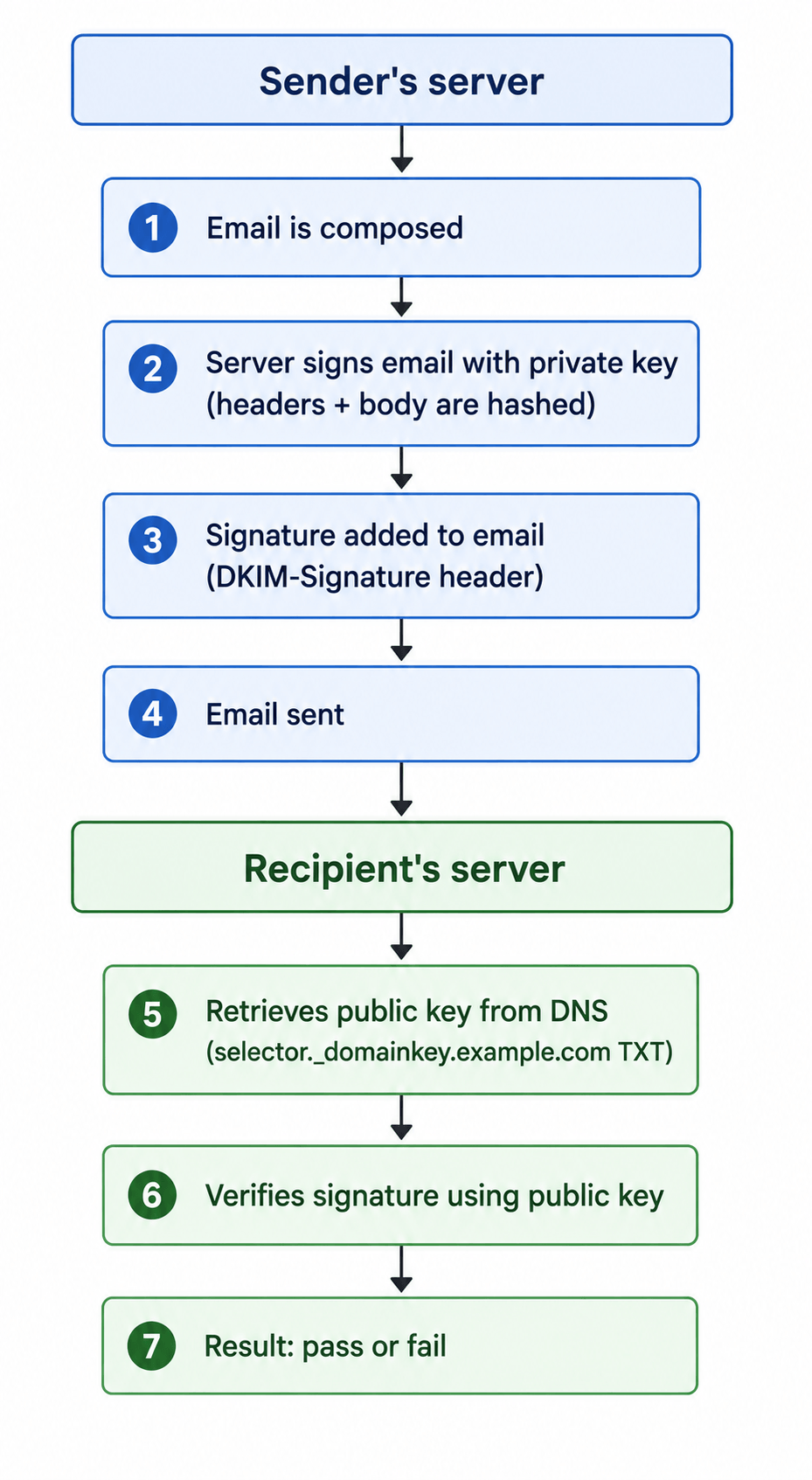
Detailed breakdown:
DKIM-Signature header field.selector1._domainkey.example.com).A DKIM record is a DNS TXT record that stores the public key. It is published under a selector name:
selector1._domainkey.example.com. IN TXT "v=DKIM1; k=rsa; p=MIGfMA0GCSqGSIb3DQEBAQUAA4GNADCBiQKBgQC..."| Component | Meaning |
|---|---|
| selector | Identifies the specific key pair (allows key rotation) |
| _domainkey | Fixed part of the record (required for DKIM) |
| v=DKIM1 | Version identifier (must be “DKIM1”) |
| k=rsa | Key type (RSA is the standard; Ed25519 is emerging) |
| p=… | Public key (base64 encoded) |
Important: The public key is stored in the DNS TXT record, while the private key remains securely on the sending server. A common mistake is publishing the private key instead of the public key.
The DKIM-Signature header is added to every signed email:
DKIM-Signature: v=1; a=rsa-sha256; c=relaxed/relaxed;
 d=example.com; s=selector1; t=1690000000;
bh=...; h=from:to:subject; b=...| Field | Meaning |
|---|---|
v=1 | DKIM version |
a=rsa-sha256 | Signing algorithm (RSA with SHA-256) |
c=relaxed/relaxed | Canonicalisation method (header/body) |
d=example.com | Signing domain |
s=selector1 | Selector name (points to DNS record) |
t=1690000000 | Timestamp (UNIX epoch) |
bh=... | Body hash |
h=from:to:subject | Headers included in the signature |
b=... | Digital signature |
DKIM supports two canonicalisation methods:
simple – No changes tolerated. The message must be byte‑for‑byte identical for verification to pass.relaxed – Allows minor modifications (whitespace changes, line wrapping) that often occur during email transit.The format is header/body (e.g., relaxed/relaxed). For most use cases, relaxed/relaxed is recommended because it tolerates common modifications while maintaining security.
The following header fields should be included in the signature if present:
A selector is a name that identifies a specific DKIM key pair for a domain. It allows a domain to have multiple keys active simultaneously, which is essential for key rotation.
Choose names that are:
google_2026, mailchimp_q3)Key rotation is the process of replacing a DKIM private key with a new one to maintain security.
selector2).| Mistake | Why It’s a Problem | Fix |
|---|---|---|
| Syntax errors (quoting, semicolons, base64) | Invalid DNS record format; verification fails | Validate the record with a DKIM checker before publishing |
| Selector/domain mismatch | Receiving server looks up the wrong key | Ensure the selector in DNS matches the one in the DKIM-Signature header |
| Incorrect key splitting | Some DNS providers have 255‑character TXT record limits; splitting incorrectly breaks the record | Use proper quoting for multi‑line TXT records; some providers automatically handle splitting |
| Weak or outdated keys (1024‑bit RSA) | 1024‑bit keys are considered weak and rejected by some providers | Use RSA‑2048 minimum |
| Private key exposed | Attackers can sign fraudulent emails | Keep the private key secure; never share it |
| Not signing critical headers | Modification of unsigned headers is undetectable | Always sign the From header (REQUIRED) and other key headers |
| DNS propagation delay | Verification fails until DNS propagates | Wait 24‑48 hours before testing, and set appropriate TTLs |
| Using a CNAME instead of a TXT record | DKIM lookups expect TXT records; CNAMEs may cause resolution issues | Always use a TXT record for DKIM |
| Incorrect record name format | Record name must end with ._domainkey.yourdomain.com | Use the exact format: selector._domainkey.example.com |
| Tool | Purpose |
|---|---|
| MXToolbox DKIM Check | Validates DKIM record existence and syntax |
| DKIM Core Validator | Comprehensive DKIM signature verification |
| Google Admin Toolbox | Email header analyser |
dig TXT selector1._domainkey.example.com +shortExpected output:
"v=DKIM1; k=rsa; p=MIGfMA0GCSqGSIb3DQEBAQUAA4GNADCBiQKBgQC..."In your email client, view the full headers and look for:
Authentication-Results: dkim=pass header.d=example.com;A pass result means the DKIM signature was successfully verified.
From header (REQUIRED), and include Sender, Reply‑To, Subject, Date, and Message‑ID when present.Authentication-Results header shows dkim=pass.relaxed/relaxed canonicalisation. This tolerates minor modifications during transit while maintaining security.Ed25519 offers equivalent or better security than RSA‑2048 with just 256‑bit keys-an 8× reduction in DNS record size. Signature verification is also 10‑20× faster than RSA‑2048.
However: Not all receivers can verify Ed25519 signatures yet.
Recommendation for 2026: Use RSA‑2048 as your default. If you want to use Ed25519, implement it as a dual signature alongside RSA‑2048-never use Ed25519 alone.
DKIM is essential for DMARC because:
d= tag matching the domain in the header From) is required for DMARC to pass.Without DKIM, DMARC enforcement is less effective because SPF fails when email is forwarded.
DKIM (DomainKeys Identified Mail) is a critical component of modern email authentication. By adding a cryptographic signature to every outgoing email, DKIM allows receiving servers to verify that the email genuinely came from your domain and has not been tampered with in transit.
Unlike SPF, DKIM works through email forwarding because the signature travels with the email. This makes DKIM essential for DMARC enforcement, particularly when email is forwarded.
For 2026, RSA 2048‑bit keys are the recommended default, meeting RFC 8301 and major provider requirements. Keys should be rotated every 6 to 12 months using a parallel selector to avoid downtime. Ed25519 is an emerging alternative but should only be used with dual-signing alongside RSA‑2048.
DKIM is not a complete solution on its own. It must be combined with SPF (to authorise sending IPs) and DMARC (to enforce policies and verify header From alignment) for comprehensive email authentication.
Need help setting up email authentication for your domain? Playful Sparkle has been engineering digital products since 2004, offering Web Development, App Development, and security consulting services. Our team can help you configure SPF, DKIM, DMARC, and BIMI for your domain. Contact us to discuss how we can help you secure your email.



Learn how eight compromised eMudhra private keys put website trust at risk, which systems may be affected, and what businesses, developers, and users should do.

Facebook introduced link-sharing limits for selected Pages in 2026. Learn how the restrictions affect businesses and how your website, email subscribers, and other channels can help you find customers beyond Facebook.

On October 21, 2026, two critical PHP vulnerabilities, CVE-2026-109618 and CVE-2026-109619, were disclosed, enabling potential unauthenticated remote code execution. Learn which PHP versions are affected, how the flaws impact WordPress and other websites, and how to secure your servers.

