Let’s Build Something Great
Tell us about your goals and request a free project estimate.


p=reject enforcement, leaving the vast majority vulnerable to impersonation attacks.p=none → p=quarantine → p=reject.np=, psd=) and deprecated pct=, rf=, and ri=.Email spoofing remains one of the most effective attack vectors for cybercriminals. SPF and DKIM provide authentication, but they lack enforcement. DMARC closes this gap by telling receiving mail servers what to do when an email fails authentication.
This guide explains DMARC – how it works, how to implement it, and what changed in 2026.
DMARC (Domain‑based Message Authentication, Reporting & Conformance) is an email authentication protocol that builds on SPF and DKIM. It was originally defined in RFC 7489 (2015). In May 2026, the IETF published RFC 9989, 9990, and 9991, moving DMARC from Informational to Standards Track.
What DMARC does:
none, quarantine, or reject)The problem DMARC solves: SPF and DKIM alone are not enough. SPF only checks the envelope sender; DKIM only verifies signatures. Neither prevents an attacker from spoofing the header From address that users actually see. DMARC bridges this gap by requiring alignment and enforcing policy.
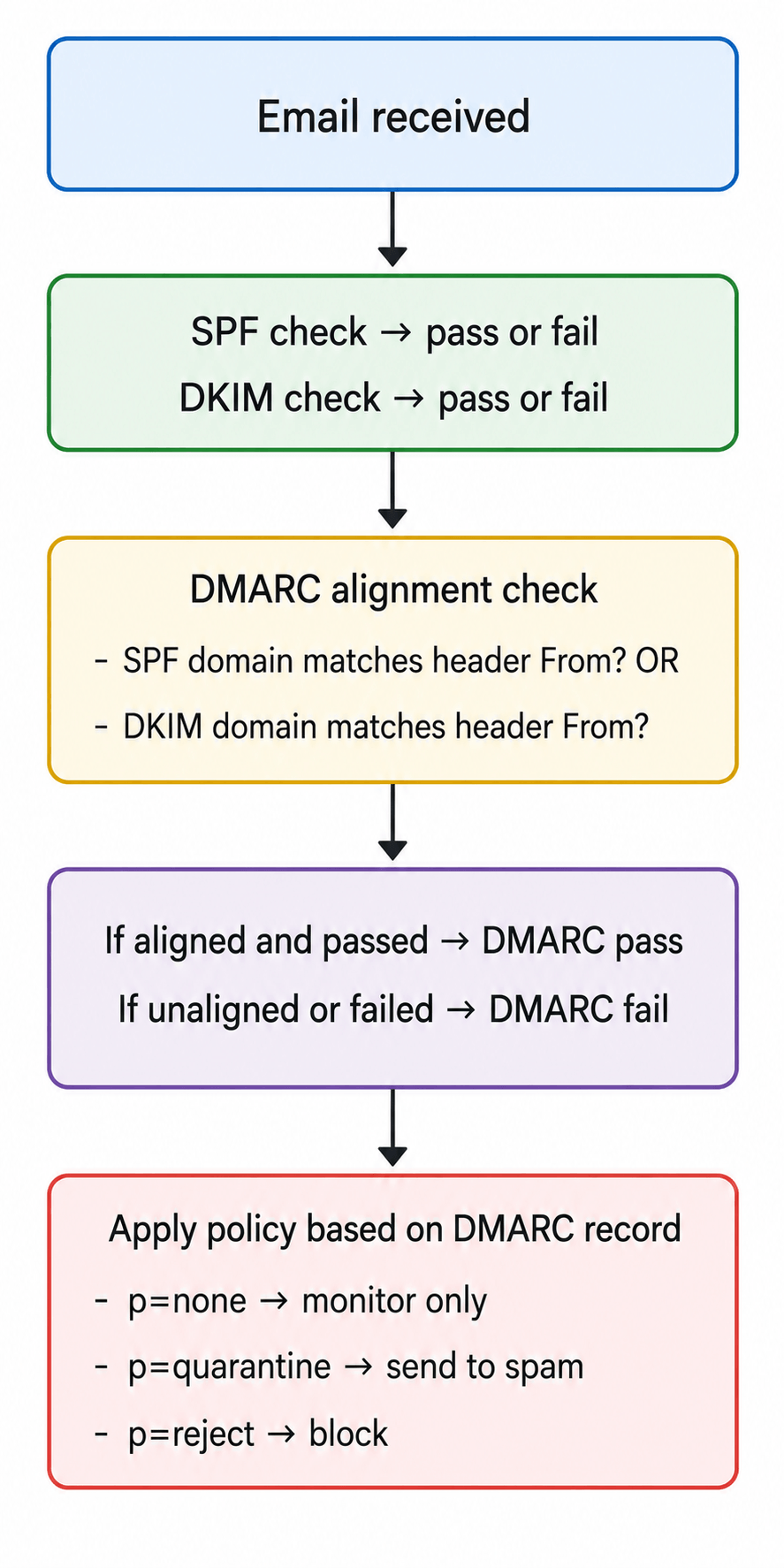
For DMARC to pass, at least one of the following must be true:
d=) matches the domain in the header FromAlignment can be:
r (relaxed): Allows subdomain matches (e.g., sub.example.com aligns with example.com)s (strict): Requires an exact matchv=DMARC1; p=reject; rua=mailto:dmarc-reports@example.com; ruf=mailto:dmarc-forensic@example.com; sp=reject| Tag | Meaning | Required |
|---|---|---|
v=DMARC1 | Version identifier | Yes – Required |
p= | Policy (none / quarantine / reject) | Yes -Required |
sp= | Subdomain policy | Optional |
np= | Non‑existent subdomain policy (new in RFC 9989) | Optional |
rua= | Aggregate report destination | Optional |
ruf= | Forensic report destination | Optional |
psd= | Public Suffix Domain (new in RFC 9989) | Optional |
| Tag | Status | Replacement |
|---|---|---|
pct= | Deprecated | Use t=y for testing instead |
rf= | Deprecated | Report format is now standardised |
ri= | Deprecated | Report interval is now managed by receivers |
np= (Non‑existent subdomain policy): Defines how to handle messages from subdomains that do not exist. Can be set to none, quarantine, or reject.
psd= (Public Suffix Domain): Replaces the Public Suffix List with DNS Tree Walk and Public Suffix Domains (PSD). Options:
psd=y – treat the domain as an organisational domainpsd=n – do not treat as an organisational domainpsd=u – unknown (default behaviour)t=y (Test mode): Indicates that the published DMARC policy should not be applied – acts like pct=0.
Example modern DMARC record (RFC 9989):
v=DMARC1; p=reject; np=quarantine; psd=y; rua=mailto:dmarc-reports@example.com; ruf=mailto:dmarc-forensic@example.com| Policy | Effect | When to Use |
|---|---|---|
p=none | Monitor only – reports sent, no action | Initial deployment, data collection |
p=quarantine | Mark suspicious emails as spam | After identifying all legitimate senders |
p=reject | Block unauthenticated emails | Full protection |
The safest DMARC configuration strategy is to start with p=none, monitor authentication reports, and gradually move to p=quarantine and p=reject enforcement:
p=none (Monitoring) – Collect data for 30–60 days. Identify all legitimate sending sources.p=quarantine (Testing) – Test enforcement. Identify and fix any remaining issues.p=reject (Full protection) – Block all unauthenticated emails.RUF best practices: Enable ruf= only if you have a dedicated processor for the data. Forensic reports can contain sensitive information – handle with care.
| Phase | Policy | Duration | Purpose |
|---|---|---|---|
| 1 | p=none | 30–60 days | Collect data, identify all senders |
| 2 | p=quarantine | 30+ days | Test enforcement, identify issues |
| 3 | p=reject | Permanent | Full protection |
Google recommends starting with p=none for one week, monitoring reports, then moving to p=quarantine for a small percentage of messages before full rollout.
| Metric | Value | Source |
|---|---|---|
| DMARC adoption | 52.1% (937,931 domains) | EasyDMARC 2026 |
Domains with enforcement (p=quarantine or p=reject) | 22.9% (411,935 domains) | EasyDMARC 2026 |
Domains with full p=reject protection | 10.7% | DmarcDkim.com |
| Fortune 500 with DMARC | 95% | EasyDMARC 2026 |
| Fortune 500 with enforcement | 80%+ | EasyDMARC 2026 |
| Fortune Global 500 with enforcement | 63% | SimpleDMARC 2026 |
Fortune Global 500 with p=reject | 48% | SimpleDMARC 2026 |
| Domains with no DMARC record | 20.6% of Fortune Global 500 | SimpleDMARC 2026 |
Key insight: While DMARC adoption has grown significantly, only 10.7% of domains have full p=reject protection. The vast majority remain vulnerable to impersonation attacks.
| Mistake | Why It’s a Problem | Fix |
|---|---|---|
Staying on p=none indefinitely | No enforcement – attackers still succeed | Move to p=quarantine then p=reject |
| Missing alignment | SPF/DKIM pass but don’t align with header From | Ensure SPF and DKIM domains match header From |
| Not monitoring reports | No visibility into who is sending using your domain | Set up RUA and RUF reporting |
| Invalid syntax | Record is ignored or misinterpreted | Validate your DMARC record |
| Not implementing subdomain policy | Attackers can spoof subdomains | Add sp=reject for subdomains |
| Using deprecated tags | Tags like pct=, rf=, ri= are ignored in RFC 9989 | Remove deprecated tags |
Not using np= for non‑existent subdomains | Attackers can spoof subdomains that don’t exist | Add np=reject |
| Tool | Purpose |
|---|---|
| MXToolbox DMARC Check | Validates DMARC record existence and syntax |
| dmarcian DMARC Check | Comprehensive DMARC validation |
| Google Admin Toolbox | Email header analyser |
dig TXT _dmarc.example.com +shortExpected output:
"v=DMARC1; p=reject; rua=mailto:dmarc-reports@example.com"Look for:
Authentication-Results: dmarc=pass header.from=example.com;A pass result means DMARC successfully authenticated the email.
p=none to collect data. Monitor aggregate reports for 30–60 days.p=quarantine after verification. Test enforcement and identify any remaining issues.p=reject after 90+ days. Full protection.sp=reject for subdomains.np= tag. Set np=reject for non‑existent subdomains.pct=, rf=, and ri= are no longer used.relaxed alignment (adkim=r; aspf=r) for initial deployment, then consider strict later.In May 2026, the IETF published three documents that update the DMARC protocol:
Key changes:
| Change | Impact |
|---|---|
| Moved to Standards Track | DMARC is now an IETF Proposed Standard |
| Public Suffix List replaced | Now uses DNS Tree Walk and Public Suffix Domains (PSD) |
pct= deprecated | Use t=y for testing instead |
rf= deprecated | Report format is now standardised |
ri= deprecated | Report interval now managed by receivers |
np= added | Policy for non‑existent subdomains |
psd= added | Public Suffix Domain handling |
Action required: Review and update your DMARC records to remove deprecated tags and add the new np= tag.
DMARC is the enforcement layer that SPF and DKIM lack. By telling receiving mail servers what to do with unauthenticated email – monitor, quarantine, or reject – DMARC provides the protection that stops domain spoofing.
In May 2026, the IETF published RFC 9989, 9990, and 9991, moving DMARC to Standards Track and introducing new tags (np=, psd=) while deprecating others (pct=, rf=, ri=). Organisations must update their DMARC records accordingly.
Implementation follows a clear progression: start with p=none to collect data, move to p=quarantine to test enforcement, then p=reject for full protection. Monitor aggregate and forensic reports throughout to identify legitimate senders and debug failures.
The cost of non‑compliance is significant. DMARC adoption has reached 52.1% of domains, but only 10.7% have full p=reject enforcement – leaving the vast majority vulnerable to impersonation attacks. By implementing DMARC correctly, you protect your brand, your customers, and your business.
Need help setting up email authentication for your domain? Playful Sparkle has been engineering digital products since 2004, offering Web Development, App Development, and security consulting services. Our team can help you configure SPF, DKIM, DMARC, and BIMI for your domain. Contact us to discuss how we can help you secure your email.



Learn how eight compromised eMudhra private keys put website trust at risk, which systems may be affected, and what businesses, developers, and users should do.

Facebook introduced link-sharing limits for selected Pages in 2026. Learn how the restrictions affect businesses and how your website, email subscribers, and other channels can help you find customers beyond Facebook.

On October 21, 2026, two critical PHP vulnerabilities, CVE-2026-109618 and CVE-2026-109619, were disclosed, enabling potential unauthenticated remote code execution. Learn which PHP versions are affected, how the flaws impact WordPress and other websites, and how to secure your servers.

