Let’s Build Something Great
Tell us about your goals and request a free project estimate.


Images are no longer just visual enhancements for your content. They are a primary discovery mechanism. Google Images processes billions of queries daily. AI-powered search engines like ChatGPT, Gemini, and Perplexity increasingly rely on visual content to answer user questions. And search engines use images to understand page context, entity relationships, and content quality.
Yet most image SEO advice remains stuck in the early 2010s. “Add alt text. Compress your files. Use descriptive filenames.” These basics still matter-but they are no longer sufficient.
Modern image optimization spans four interconnected disciplines:
This guide covers the complete spectrum. It draws on Google’s official documentation, current research, and real-world implementation experience to provide a practical, technically accurate reference for developers, SEO professionals, and site owners.
Image SEO is the practice of optimizing images to improve their visibility in search engines, enhance page performance, ensure accessibility, and make visual content understandable to AI systems.
The goals of image SEO are:
Image SEO is not a single tactic. It is a system of interrelated practices: file naming, alt text, compression, responsive delivery, structured data, metadata, and page context. Each component reinforces the others.
Google Images does not “see” images the way humans do. It relies on a combination of signals:
A comprehensive study across 50,000 search queries found that pages with descriptively named images ranked an average of 2.3 positions higher in image search results compared to those with generic filenames.
Bing Images uses similar signals but places additional emphasis on:
AI search engines like ChatGPT, Gemini, and Perplexity use fundamentally different mechanisms to understand images. They rely on:
Architecture diagram: How search engines and AI understand images:
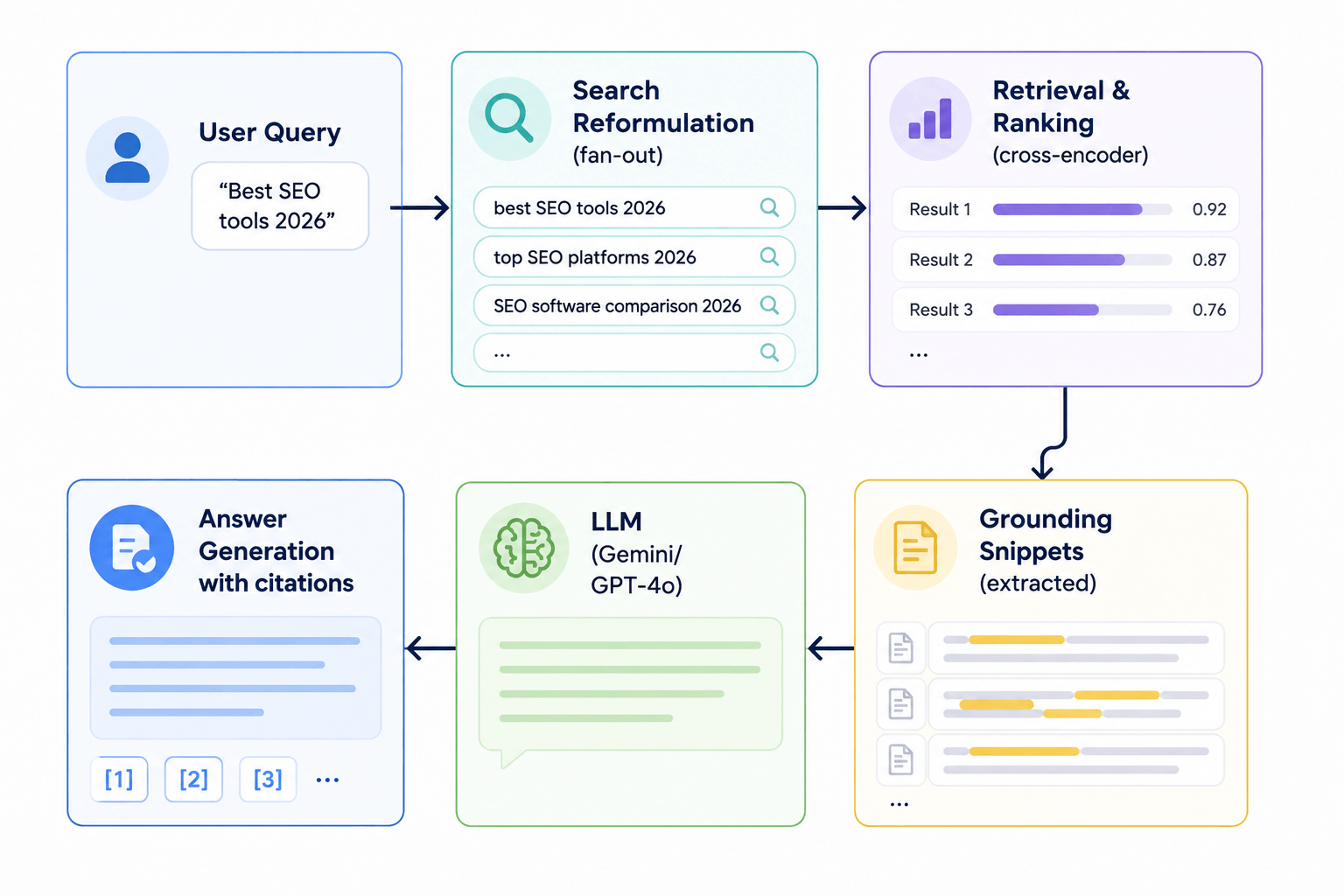
AI systems process images differently from traditional search engines. Understanding these mechanisms helps you optimize for AI-driven discovery.
Models like Gemini, GPT-4 with vision, and Claude process images through transformer-based architectures that map visual features to textual representations. They do not “see” pixels; they generate embeddings that capture semantic meaning.
Why this matters: AI models rely heavily on surrounding text, metadata, and structured data. A well-optimized image with clear context is more likely to be understood correctly.
AI systems increasingly use OCR to extract text from images. If your images contain important information (charts, diagrams, product labels), ensure the text is also available in HTML or alt text.
AI systems identify entities (people, places, products) within images and associate them with your brand. This is particularly important for e-commerce and local businesses.
AI models analyze the entire page context-not just the image itself. Headings, paragraphs, lists, and surrounding content all contribute to how the image is understood.
In 2026, relying on filenames and alt text is insufficient. AI systems use:
Based on Google’s documentation, industry research, and real-world studies, here are the confirmed and likely image ranking factors:
| Factor | Importance | Evidence |
|---|---|---|
| Alt text | High | Primary textual description; used for accessibility and ranking |
| Page context | High | Surrounding text, headings, and content relevance |
| File name | Medium | Descriptive filenames improve ranking by ~2.3 positions |
| Structured data | High | Explicitly describes image content and relationships |
| Performance | High | Core Web Vitals impact both page and image ranking |
| Resolution | Medium | High-resolution images perform better in image search |
| Originality | High | Unique images outperform stock photos |
| Factor | Importance | Evidence |
|---|---|---|
| Image quality | Medium | Clear, well-lit images are preferred |
| Internal linking | Medium | Images linked from relevant pages gain authority |
| External links | Medium | Backlinks to image landing pages |
| Freshness | Medium | Recently published or updated images |
| Accessibility | Medium | WCAG compliance signals quality |
| Licensing | Low | Clear licensing information helps discovery |
| Myth | Reality |
|---|---|
| EXIF data directly affects ranking | No evidence that EXIF metadata improves ranking directly |
| Stock photos are always worse | Unique images perform better, but high-quality stock photos can still rank |
| Image size doesn’t matter | File size affects performance, which affects ranking |
Selecting the correct image format is the first step in image optimization. Each format has distinct characteristics.
| Format | Compression | Transparency | Animation | Browser Support | Best For |
|---|---|---|---|---|---|
| JPEG | Lossy | No | No | Universal | Photographs, complex images |
| PNG | Lossless | Yes | No | Universal | Graphics, logos, transparency |
| GIF | Lossless | Yes | Yes | Universal | Simple animations |
| SVG | Vector | Yes | Yes | Universal | Logos, icons, illustrations |
| WebP | Lossy/Lossless | Yes | Yes | 95.3%+ | Modern web; 25-34% smaller than JPEG |
| AVIF | Lossy/Lossless | Yes | Yes | 93.8%+ | Best compression; modern browsers |
| JPEG XL | Lossy/Lossless | Yes | Yes | Limited | Future format; experimental |
WebP is the primary format for most web projects. It achieves 25-34% smaller files than JPEG at equivalent quality, with 95.3% global browser support.
AVIF offers even better compression-typically 30-50% smaller than WebP-with 93.8% browser support.
Implementation strategy:
<picture>
 <source srcset="image.avif" type="image/avif">
 <source srcset="image.webp" type="image/webp">
 <img src="image.jpg" alt="Description">
</picture>
JPEG XL has limited support and should not be used for production sites in 2026.
Images have two size-related properties:
Use CSS to ensure images scale appropriately:
img {
 max-width: 100%;
 height: auto;
}Serve images at 2× resolution for retina displays. This means providing images with twice the pixel dimensions of the display size.
Maintain consistent aspect ratios to prevent layout shift. Use the aspect-ratio CSS property or intrinsic dimensions:
img {
 aspect-ratio: 16 / 9;
 object-fit: cover;
}
Responsive images deliver different image versions based on device capabilities, screen size, and pixel density.
<img src="image-800w.jpg"
 srcset="image-400w.jpg 400w,
 image-800w.jpg 800w,
 image-1200w.jpg 1200w"
 sizes="(max-width: 600px) 100vw,
 (max-width: 1200px) 50vw,
 33vw"
alt="Description"><picture> ElementThe <picture> element allows art direction-serving different images for different layouts:
<picture>
 <source media="(max-width: 600px)" srcset="image-mobile.jpg">
 <source media="(max-width: 1200px)" srcset="image-tablet.jpg">
 <img src="image-desktop.jpg" alt="Description">
</picture>srcset with w descriptors for resolution switchingsizes to tell the browser the expected display size<picture> for art directionCompression reduces file size without significantly impacting quality. Use the right compression strategy for each image type.
| Type | Description | Best For |
|---|---|---|
| Lossy | Removes some data to reduce size | Photographs, complex images |
| Lossless | Preserves all original data | Graphics, logos, screenshots |
Progressive JPEGs load in multiple passes, showing a low-quality preview that improves over time. This improves perceived performance.
| Quality | File Size | Use Case |
|---|---|---|
| 90-100% | Large | Hero images, high-quality photography |
| 75-85% | Medium | Standard web images |
| 60-70% | Small | Thumbnails, decorative images |
File names provide initial context to search engines and AI systems.
IMG_1234.jpgimage1.pngDSC_0245.JPGred-sports-car.jpgblue-widget-product-photo.pngchocolate-chip-cookie-recipe.jpg-) to separate words_) which are less readableDo not keyword stuff filenames. A filename like blue-widget-best-widget-affordable-widget-buy-widget.jpg is spammy and will be ignored.
Alt text is the single most important element of image SEO and accessibility. It serves three purposes:
Under WCAG 2.1 Level AA, all non-text content must have a text alternative. Decorative images should use alt=”” to be ignored by screen readers.
| Image Type | Alt Text Example |
|---|---|
| Product | Red running shoes with white soles and black laces |
| Person | Portrait of Jane Smith, CEO of Example Corp |
| Infographic | Infographic showing 30% revenue increase in Q4 2025 |
| Diagram | Diagram of TLS handshake showing client-server exchange |
| Logo | Example Corp logo |
| Decorative | alt="" |
Surrounding content provides crucial context for image understanding. Google and AI systems analyse the entire page, not just the image itself.
Use semantic HTML to structure content clearly:
<figure>
 <img src="chart.png" alt="Revenue growth chart Q4 2025">
 <figcaption>Revenue increased 30% in Q4 2025, driven by new product launches</figcaption>
</figure>
Structured data (Schema.org) provides explicit, machine-readable information about images and their relationships to the page.
{
 "@context": "https://schema.org",
 "@type": "ImageObject",
 "contentUrl": "https://example.com/image.jpg",
 "name": "Red sports car on highway",
 "description": "A red sports car driving on a highway at sunset",
 "author": {
 "@type": "Person",
 "name": "John Doe"
 },
 "license": "https://example.com/license"
}| Schema Type | Image Property | Why It Matters |
|---|---|---|
| Product | image | Shows product images in rich results |
| Recipe | image | Displays recipe photos in search |
| Article | image | Highlights article images in search |
| VideoObject | thumbnailUrl | Shows video thumbnails |
| Organization | logo | Displays brand logo in knowledge panels |
| Person | image | Shows author/creator photos |
Google recommends using structured data to describe images, including licensing information via the license property or IPTC Web Statement of Rights field.
Image metadata (EXIF, IPTC, XMP) contains information about how, when, and where an image was captured. While metadata has limited direct SEO impact, it serves important purposes:
Google may use licensing metadata to display copyright information in image search results. However, there is no evidence that EXIF data directly affects search rankings.
Remove GPS coordinates from images before publishing if location privacy is a concern. Use tools like ExifTool to strip metadata:
exiftool -all= image.jpgImage sitemaps help Google discover images that might not be easily crawled.
<urlset xmlns="http://www.sitemaps.org/schemas/sitemap/0.9"
 xmlns:image="http://www.google.com/schemas/sitemap-image/1.1">
 <url>
 <loc>https://example.com/page</loc>
 <image:image>
 <image:loc>https://example.com/image.jpg</image:loc>
 <image:caption>Red sports car on highway</image:caption>
 <image:license>https://example.com/license</image:license>
 </image:image>
 </url>
</urlset>
Each <url> tag can contain up to 1,000 <image:image> tags.
Open Graph images control how content appears when shared on social platforms.
<meta property="og:image" content="https://example.com/social-image.jpg">
<meta property="og:image:width" content="1200">
<meta property="og:image:height" content="630">| Platform | Aspect Ratio | Recommended Size |
|---|---|---|
| 1.91:1 | 1200×630 | |
| 1.91:1 | 1200×627 | |
| Slack | 1.91:1 | 1200×630 |
| Discord | 1.91:1 | 1200×630 |
Twitter Cards provide similar functionality for X.
<meta name="twitter:card" content="summary_large_image">
<meta name="twitter:image" content="https://example.com/twitter-image.jpg">Favicons appear in browser tabs, bookmarks, and search results.
favicon.ico – legacy supportfavicon.png – modern browsersfavicon.svg – vector format (recommended)Lazy loading delays loading off-screen images until they are needed.
<img src="image.jpg" alt="Description" loading="lazy">For more control, use the Intersection Observer API:
const observer = new IntersectionObserver((entries) => {
 entries.forEach(entry => {
 if (entry.isIntersecting) {
 const img = entry.target;
 img.src = img.dataset.src;
 observer.unobserve(img);
 }
 });
});Image performance directly impacts Core Web Vitals and search rankings.
LCP measures the time it takes for the largest visible element to load. For images, the target is under 2.5 seconds.
Optimization strategies:
CLS measures unexpected layout shifts. To prevent CLS:
width="800" height="600"aspect-ratio CSS propertyPreload critical images:
<link rel="preload" as="image" href="hero.jpg" fetchpriority="high">Use fetchpriority to indicate importance:
<img src="hero.jpg" alt="Hero image" fetchpriority="high">srcset and sizesImage accessibility is a legal requirement under the European Accessibility Act and WCAG.
alt="" for decorative imagesClear licensing information helps search engines understand usage rights and can improve image visibility.
Specify licensing information using Schema.org’s license property or the IPTC Web Statement of Rights field.
AI search engines are increasingly multimodal, understanding both text and images.
| Platform | Image Understanding |
|---|---|
| ChatGPT | Vision-language models with OCR and captioning |
| Gemini | Native multimodal understanding |
| Perplexity | Image search and visual discovery |
| Claude | Vision and OCR capabilities |
| Google AI | Multimodal search and visual answers |
E-commerce sites require special attention to product images.
image propertyGoogle Merchant Center requires product images to meet specific standards:
Images are critical for Google Business Profile visibility.
There is limited evidence that geotagging photos directly affects local search rankings. Focus on high-quality, relevant images and clear metadata instead.
Content Delivery Networks (CDNs) accelerate image delivery by serving content from edge locations.
| Provider | Features | Best For |
|---|---|---|
| Cloudflare Images | Integrated with Cloudflare CDN | WordPress, general use |
| Cloudinary | Real-time transformation, AI automation | Enterprise, complex workflows |
| ImageKit | Automation, real-time optimization | Development teams |
| Bunny Optimizer | Affordable, fast | Small to medium sites |
| Fastly | High-performance CDN | Large-scale operations |
Modern image CDNs automatically:
Image APIs provide on-the-fly transformation and optimisation.
https://res.cloudinary.com/demo/image/upload/w_800,h_600,c_fill/f_auto/q_auto/image.jpgImage security prevents misuse and protects your assets.
Prevent other sites from hotlinking your images:
Apache (.htaccess):
RewriteEngine on
RewriteCond %{HTTP_REFERER} !^$
RewriteCond %{HTTP_REFERER} !^https://(www\.)?example.com/ [NC]
RewriteRule \.(jpg|jpeg|png|gif)$ - [F]Generate temporary, secure URLs for private assets.
Add visible watermarks to protect copyright.
Remove GPS coordinates and other sensitive metadata before publishing.
| Mistake | Why It Hurts | Fix |
|---|---|---|
| Keyword stuffing | AI detects spam; search engines ignore | Use natural language |
| Missing alt text | Fails accessibility; misses SEO opportunity | Add descriptive alt text |
| Huge file sizes | Slows page load; hurts Core Web Vitals | Compress images aggressively |
| Wrong formats | Larger files, slower load times | Use WebP or AVIF |
| Text embedded in images | Inaccessible; not searchable | Use HTML text instead |
| Duplicate filenames | Confuses crawlers; reduces uniqueness | Use unique, descriptive names |
| No responsive images | Poor mobile experience; slower load times | Implement srcset and sizes |
| Missing structured data | Misses rich result opportunities | Add ImageObject schema |
alt=""Successful Image SEO extends far beyond alt text and compression. Modern optimization combines:
Search engines and AI systems use a combination of these signals to understand, index, and rank images. Sites that implement comprehensive image optimisation improve visibility in traditional search, AI-powered search, image search, and rich results.
The fundamentals remain important-alt text, file names, compression, and performance. But the most successful image SEO strategies in 2026 also address structured data, metadata, AI readiness, and accessibility. Images that are well-optimised for humans, search engines, and AI systems will outperform those that focus on only one dimension.
Need help optimising your images for search, performance, and AI? Playful Sparkle has been engineering digital products since 2004, offering SEO & Digital Marketing, Web Development, and UI/UX & Web Design services. Our team can help you audit and optimise your visual content for maximum visibility. Contact us to discuss how we can help you improve your image SEO.



Learn how eight compromised eMudhra private keys put website trust at risk, which systems may be affected, and what businesses, developers, and users should do.

Facebook introduced link-sharing limits for selected Pages in 2026. Learn how the restrictions affect businesses and how your website, email subscribers, and other channels can help you find customers beyond Facebook.

On October 21, 2026, two critical PHP vulnerabilities, CVE-2026-109618 and CVE-2026-109619, were disclosed, enabling potential unauthenticated remote code execution. Learn which PHP versions are affected, how the flaws impact WordPress and other websites, and how to secure your servers.

