Let’s Build Something Great
Tell us about your goals and request a free project estimate.


Website migration is the process of moving a website to a different hosting environment, domain, content management system, application architecture or URL structure. The scope can range from transferring an existing WordPress installation to a new server to replacing an entire website with a custom application built using Vue.js or React.
These projects have different technical requirements. A hosting change that preserves the existing URLs does not require the same redirect strategy as a domain migration or a complete change of URL structure. Search visibility can be affected when search engines encounter missing content, incorrect redirects, inaccessible resources, server errors or inconsistent indexing signals.
Google separates hosting migrations that preserve public URLs from migrations that change them. Its recommendations are documented in:
The following table identifies common migration scenarios and their main technical requirements.
| Migration type | What changes | Main requirements |
|---|---|---|
| Hosting migration | Hosting provider or server infrastructure | Files, database, configuration, DNS and server environment |
| Domain migration | Domain name or hostname | DNS, domain configuration, SSL certificates and permanent redirects |
| URL migration | URL paths, directory structure or permalink format | URL inventory, mapping and redirects |
| CMS migration | Content management system | Content, database, media, application functionality and URL preservation |
| Website redesign | Layout, templates and sometimes content structure | Content preservation, metadata, internal links and URL consistency |
| Frontend migration | Frontend technology or application architecture | Routing, rendering, assets, server configuration and metadata |
| E-commerce migration | Online store platform and data | Products, customers, orders, stock, payments and integrations |
Several types can occur within the same project.
For example, replacing a WordPress website with a custom React application on a new hosting provider may involve:
Where possible, separate major changes into stages. This makes it easier to identify the cause of technical and search-related problems.
No, not when the public URLs remain unchanged.
Consider a website moving from one hosting provider to another:
Old hosting: https://example.com/about-us
New hosting: https://example.com/about-us
The domain and page URL remain identical. The DNS configuration is updated to point the domain to the new infrastructure.
Visitors and search engines continue requesting the same URL. The new server must return the expected content, but there is no reason to redirect the URL to itself.
By contrast, if the page moves to another path:
Old URL: https://example.com/about-us
New URL: https://example.com/company
A permanent HTTP redirect should connect the old location with the replacement.
The distinction is important because DNS changes and HTTP redirects solve different problems. DNS determines where requests are sent. An HTTP redirect tells the client that a requested resource has moved to another URL.
Migration planning should begin with an inventory of the existing website. Do not start by copying files or changing DNS records without first establishing what needs to be preserved.
Create a list of existing URLs and identify the pages and resources that matter most.
Useful information sources include:
An XML sitemap provides a useful starting point, but it is not necessarily a complete inventory. Some URLs may receive organic traffic or external links without appearing in the current sitemap.
Google recommends using multiple sources, including sitemaps, Search Console, analytics, server logs and the CMS, when preparing a URL migration.
The inventory should include more than HTML pages. Product images, PDFs, technical documents, manuals and other downloadable resources can also receive search traffic and external links.
For important URLs, record the following information:
| Information | Why it matters |
|---|---|
| Existing URL | Identifies the resource being migrated |
| Page title and content | Helps identify the correct replacement |
| Canonical URL | Shows the preferred indexed version |
| Organic clicks and impressions | Establishes search performance before migration |
| Backlinks | Identifies URLs with external references |
| Traffic and conversions | Helps prioritise commercially important pages |
| Target URL | Defines the intended destination |
| Redirect status | Records the required HTTP response |
Do not exclude URLs simply because they are not included in the sitemap. Check which pages receive traffic, have backlinks or are referenced by other parts of the website.
An old-to-new URL mapping identifies the destination of each relevant existing URL.
For example:
| Existing URL | New URL | Action |
|---|---|---|
/about-us/ | /company/ | 301 |
/services/web-design/ | /services/web-design/ | Keep |
/blog/old-article/ | /insights/old-article/ | 301 |
/products/item-123/ | /shop/item-123/ | 301 |
/downloads/product-guide.pdf | /documents/product-guide.pdf | 301 |
/old-event/ | No replacement | 404 or 410 |
Every relevant old URL should have a defined outcome:
Avoid redirecting unrelated pages to the homepage. For example, redirecting an old product page to a general company page does not provide a meaningful replacement.
Google warns that irrelevant redirects can confuse visitors and may be treated as soft 404 errors. Its migration documentation explains this distinction and recommends redirecting consolidated content to an appropriate replacement.
Source: Google: Site Moves with URL Changes.
Build the new website in a staging environment before switching production traffic.
Where possible, protect staging with authentication so that it is not publicly accessible. If temporary noindex directives or crawling restrictions are used, make sure they are removed or corrected before launch.
Test the following areas:
Pay particular attention to the production URL structure. A website can look correct in staging but still produce incorrect URLs, canonical tags or redirects after deployment.
The website’s architecture determines what must be transferred and how incoming URLs should be handled. A WordPress installation, a static HTML website and a React single-page application do not store or serve content in the same way.
Content management systems such as WordPress, Drupal, Joomla and TYPO3 commonly use a database together with application files.
The database stores content and application records. The file system contains the CMS core, themes, plugins, extensions, uploaded media and custom code.
A migration may require transferring:
The exact structure depends on the CMS and its extensions.
For example, WordPress commonly stores post and page content in wp_posts, metadata in wp_postmeta and general website settings in wp_options. Other platforms use different database structures. Drupal entities, for example, are represented through their own database and configuration systems.
Moving the database without the corresponding application files can result in missing themes, plugins, images or functionality. Moving only the files can leave the new application connected to an outdated or empty database.
A CMS migration must therefore account for the database, files and their configuration together.
A static website generally serves pre-generated HTML, CSS, JavaScript and media files. Unlike a traditional WordPress installation, it does not necessarily require a database to serve its pages.
A typical static website could have the following structure:

Migration focuses on transferring the generated files, preserving their directory structure and configuring the new hosting environment.
Important considerations include:
A static frontend can still depend on a headless CMS, database, external API or build pipeline.
For example, a website built with a static site generator may retrieve content from a headless CMS during deployment. In that case, copying the generated HTML files is not sufficient to preserve the complete publishing workflow.
The source repository, CMS connection, build configuration and deployment process may also need to be migrated.
Vue.js and React are frontend technologies. Their presence does not automatically determine how a website renders pages or handles requests.
A project may use:
These architectures handle direct URL requests differently.
A single-page application (SPA) commonly loads one main HTML document and uses JavaScript to display different pages without requesting a new HTML document for every navigation.
For example, a Vue or React website may contain these routes:
https://example.com/
https://example.com/services/
https://example.com/services/web-development/
https://example.com/contact/
The application router handles navigation between the views.
When a visitor clicks an internal link, the application can update the browser URL through the History API without requesting a completely new HTML document.
This creates an important requirement when a visitor opens a nested URL directly or refreshes the browser.
For example, when someone enters https://example.com/services/web-development the web server receives a request for /services/web-development/.
If no physical file or directory exists at that location, a basic static server may return 404.
For applications using HTML5 history mode, the server normally needs a fallback that serves the application’s index.html for application routes.
This is an internal rewrite, not an HTTP redirect. The browser retains the requested URL.
Vue Router supports HTML5 history mode through createWebHistory().
A typical configuration looks like this:
import { createRouter, createWebHistory } from 'vue-router'

const router = createRouter({
  history: createWebHistory(),
  routes: [
    {
      path: '/',
      component: HomePage
    },
    {
      path: '/services/',
      component: ServicesPage
    },
    {
      path: '/services/web-development/',
      component: WebDevelopmentPage
    }
  ]
})
Creating the application routes is not enough. The server must also be configured to serve the application’s entry document when a visitor requests a valid client-side route directly.
Vue Router provides official examples for Apache, Nginx, Node.js, Netlify and other hosting environments.
The following example assumes that the application is deployed at the domain root and uses Apache 2.4 or later.
<IfModule mod_negotiation.c>
    Options -MultiViews
</IfModule>

<IfModule mod_rewrite.c>
    RewriteEngine On
    RewriteBase /

    RewriteRule ^index\.html$ - [END]

    RewriteCond %{REQUEST_FILENAME} !-f
    RewriteCond %{REQUEST_FILENAME} !-d

    RewriteRule . /index.html [END]
</IfModule>
This configuration checks whether the requested path matches an existing file or directory. If neither exists, Apache internally serves index.html.
The [END] flag stops further per-directory rewrite processing after the substitution. This is useful in .htaccess configurations where [L] can otherwise cause another rewrite pass.
The server must have mod_rewrite enabled and permit the required .htaccess overrides. The Options -MultiViews directive additionally requires permission to use the Options directive. If the hosting environment does not permit these settings, configure them in the Apache virtual host instead.
The fallback should also be coordinated with API routes and static assets so that requests for missing JavaScript, CSS or API resources do not incorrectly receive the HTML application shell.
server {
    listen 80;
    server_name example.com;

    root /var/www/example.com/dist;
    index index.html;

    location ^~ /assets/ {
        try_files $uri =404;
    }

    location / {
        try_files $uri $uri/ /index.html;
    }
}
The /assets/ location prevents missing asset requests from being handled by the application fallback. API routes, where applicable, should also have their own location and upstream handling before the general application route.
Nginx checks for the requested file and directory first. If neither exists, it internally serves the application entry document.
Source: Nginx: try_files Directive.
React does not impose one universal routing system. Projects may use React Router, Next.js or another routing framework.
For a client-side React SPA using browser history, the hosting server needs an equivalent fallback configuration. This requirement is not specific to React. It applies to client-side applications using clean URLs and the History API.
Next.js provides a framework-level redirect configuration through next.config.js.
For example:
/** @type {import('next').NextConfig} */
const nextConfig = {
  async redirects() {
    return [
      {
        source: '/old-page',
        destination: '/new-page',
        permanent: true
      }
    ]
  }
}

module.exports = nextConfig
In Next.js, permanent: true produces HTTP 308. Setting permanent: false produces HTTP 307.
These are actual HTTP redirects for incoming requests handled by the Next.js deployment. They are not equivalent to a client-side navigation call.
There is also an important limitation: Next.js documentation notes that, when using the Pages Router, these configured redirects are not automatically applied to client-side Link or router.push navigation unless a matching Proxy is involved.
For static exports and other hosting configurations, check the deployment platform’s routing capabilities rather than assuming that every Next.js server feature is available.
Source: Next.js: Redirects Configuration.
This distinction is important when migrating previously indexed URLs.
Client-side navigation:
router.push('/new-page')This changes the application route in the browser. It does not necessarily produce an HTTP redirect response.
HTTP permanent redirect:
HTTP/1.1 301 Moved Permanently
Location: /new-page
The server returns a permanent redirect response, and the browser requests the new URL.
For URL migrations, use server-side, reverse-proxy, framework-server or CDN redirects whenever possible.
Google recommends server-side permanent redirects, such as 301 and 308. Client-side redirects should be considered a fallback when server-side implementation is unavailable.
Vue and React projects can also generate HTML during a build or render pages on a server.
The migration requirements depend on the rendering approach.
| Architecture | How pages are delivered | Migration considerations |
|---|---|---|
| Client-side rendering (CSR) | Browser loads an application shell and renders route content with JavaScript | Server fallback and client-side routing |
| Static site generation (SSG) | HTML pages are generated during the build | Generated files, route paths and deployment configuration |
| Server-side rendering (SSR) | Server generates HTML for individual requests | Server runtime, routes and HTTP response handling |
| Hybrid rendering | Combines pre-rendered and server-rendered routes | Build output, runtime configuration and route-specific handling |
Do not assume that every Vue or React website needs the same server configuration.
Identify the rendering architecture first, then configure the new environment according to the application’s actual routing and rendering behaviour.
A catch-all fallback to index.html is a common solution for single-page applications, but it introduces an important SEO consideration.
If every unknown URL receives the application shell with HTTP 200, the server reports that the request succeeded even when the application subsequently displays a not-found message.
For example:
https://example.com/valid-route/
HTTP 200
and:
https://example.com/nonexistent-route/
HTTP 200
Both requests may return the same index.html document. This is not a true 404 response. Google can identify such pages as soft 404s, which can prevent nonexistent URLs from being properly excluded from search results.
A Vue Router catch-all route can display a not-found component, but it does not automatically change the HTTP status returned by the server.
There are several ways to handle this:
noindex robots directive to the error page.The noindex approach must be implemented correctly and tested in the rendered page. It is not equivalent to returning a true HTTP 404.
Google explains these options in JavaScript SEO Basics.
Database and file migration are separate operations, but both are necessary when moving a website that depends on persistent data.
Database migration involves exporting records from the existing database, transferring them to the new environment and importing them into the destination database.
A typical process includes:
For example, WordPress provides WP-CLI commands for exporting and importing databases.
Export the existing WordPress database:
wp db export database-backup.sqlImport the database on the new server:
wp db import database-backup.sqlThe destination database must already exist and be configured in the new WordPress installation. wp db import executes the SQL statements against the database defined by the DB_HOST, DB_NAME, DB_USER and DB_PASSWORD settings. It does not create the database itself.
Sources: WP-CLI: Database Export and WP-CLI: Database Import.
When moving WordPress to a new domain, old domain references may remain in the database.
For example:
https://old-domain.com/wp-content/uploads/image.jpgmay need to become:
https://new-domain.com/wp-content/uploads/image.jpgOrdinary SQL search-and-replace operations can damage PHP serialized data. Serialized values contain information about string lengths, so replacing a URL without updating its serialized representation can corrupt stored settings.
WP-CLI provides a search-replace command that handles PHP serialized values.
First, test the replacement without making changes:
wp search-replace \
  'https://old-domain.com' \
  'https://new-domain.com' \
  --all-tables-with-prefix \
  --dry-run
After reviewing the output, run the actual replacement:
wp search-replace \
  'https://old-domain.com' \
  'https://new-domain.com' \
  --all-tables-with-prefix
The command should be used with a verified database backup. On WordPress Multisite, note that the default command operates on the current site. The --network option is needed when the intended operation covers the network’s tables.
Source: WP-CLI: Search and Replace.
An e-commerce migration requires additional planning because the database may continue to receive transactions while the migration is being prepared.
A WooCommerce store can process:
A database backup taken before the final migration does not include transactions created afterwards.
The migration plan therefore needs a way to handle new and updated records between the initial backup and the final launch.
Typical approaches include:
The appropriate method depends on store traffic, database size, payment integrations and hosting infrastructure.
WooCommerce also supports High-Performance Order Storage (HPOS), which stores order data in dedicated WooCommerce tables instead of relying solely on the traditional WordPress posts and postmeta tables.
Do not assume that WooCommerce orders are always stored in wp_posts and wp_postmeta. Check whether the original store uses HPOS, whether the destination supports it and whether order data synchronization is complete.
Official documentation:
For a small store, a short, carefully scheduled maintenance window may be sufficient. A busy store with frequent orders may need a more controlled synchronization process.
Do not allow the old and new stores to process orders independently without a deliberate synchronization design. This can result in duplicate transactions, inconsistent stock levels and missing customer records.
Files must be transferred separately from the database unless the migration tool explicitly handles both.
A typical WordPress installation has a structure similar to this:
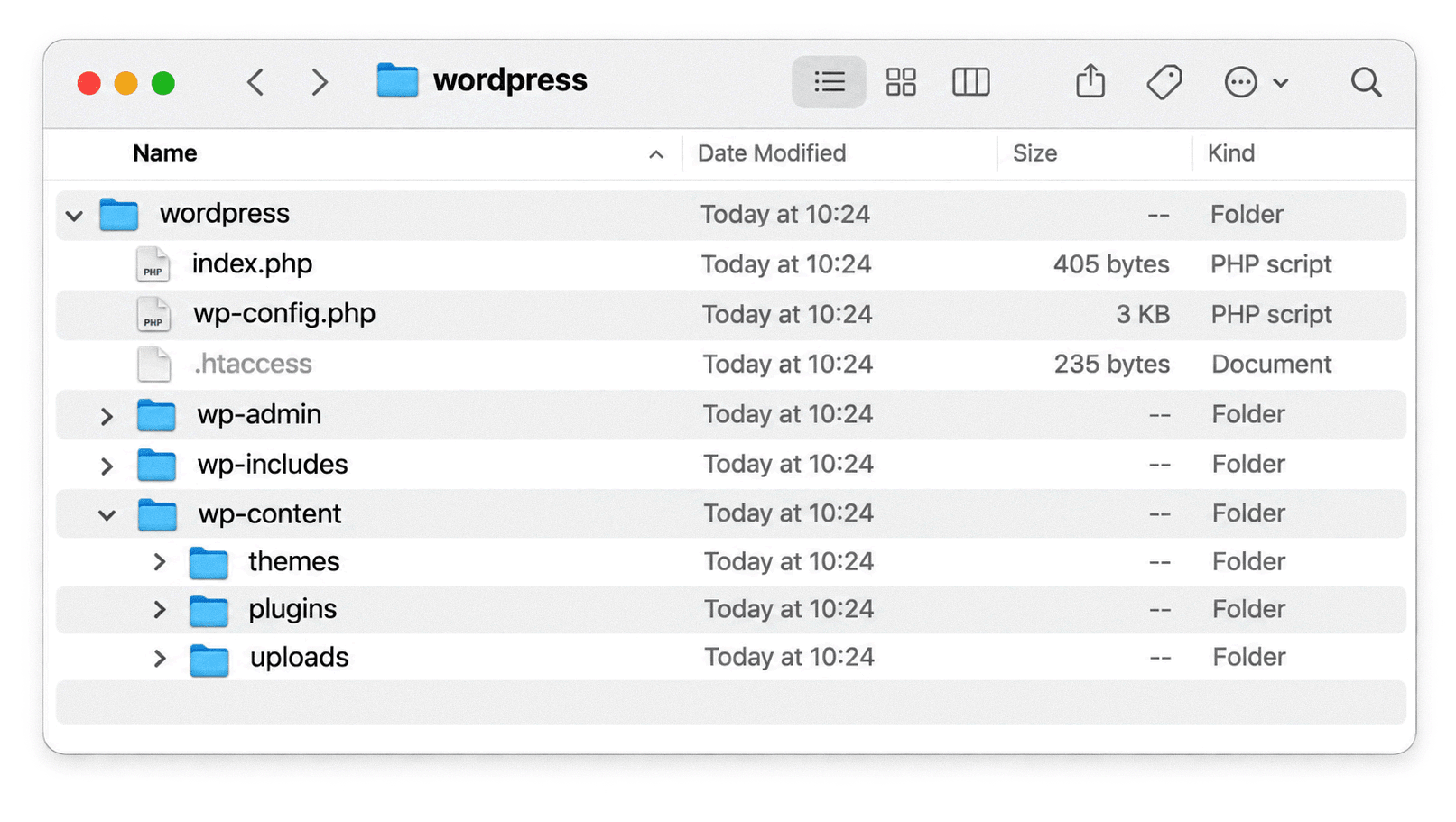
The document root may have a hosting-specific name such as public_html, htdocs or www. The actual WordPress directory structure should be preserved.
Important files and directories can include:
When transferring files, check permissions, ownership, filenames, directory structure and availability through HTTP.
A migration may successfully transfer all images but leave their database references pointing to the previous domain. A new server may also have different permissions that prevent the application from serving uploaded files.
A website also depends on settings that may not be stored in its database or publicly accessible directories.
Review:
These dependencies are particularly relevant when moving from shared hosting to VPS infrastructure, containers or cloud hosting.
A website can load successfully while certain integrations remain broken. Test the actual workflows rather than treating the homepage as proof of a successful migration.
A redirect tells a browser or search engine that the requested resource is available at another URL.
The server communicates the redirect through an HTTP status code and a Location response header.
The appropriate status code depends on whether the move is permanent or temporary and whether the original HTTP request method must be preserved.
A permanent redirect indicates that the original URL has moved to another location.
A 301 redirect is commonly used for website migrations involving ordinary webpage requests.
Example:
HTTP/1.1 301 Moved Permanently
Location: https://example.com/new-page/
Use it when:
Google recognises permanent redirects as a strong signal that the destination should become the canonical URL.
One technical detail matters: 301 behaviour can allow clients to change a POST request into GET during redirection. This is normally not a concern for ordinary webpage navigation, which generally uses GET.
A 308 also indicates a permanent move, but it preserves the original HTTP request method and body.
This is relevant to API endpoints and other routes that handle POST, PUT or similar requests.
For normal HTML page migrations, 301 is generally sufficient. Use 308 when permanent redirection must preserve the request method.
Google explicitly recommends server-side permanent redirects, including 301 and 308, for site moves.
A temporary redirect indicates that the original URL is expected to become available again.
A 302 is a temporary redirect.
Example:
HTTP/1.1 302 Found
Location: https://example.com/temporary-page/
It can be used for temporary page locations, short-term campaign changes or temporary routing.
A 307 also indicates a temporary move, but it preserves the original request method and body.
It is useful when a temporary redirect must preserve a POST or another request method.
Do not use temporary redirects for a permanent website migration simply because they appear to work in the browser.
A 303 See Other is commonly used after a form submission or another operation when the browser should retrieve a different resource using GET.
For example:
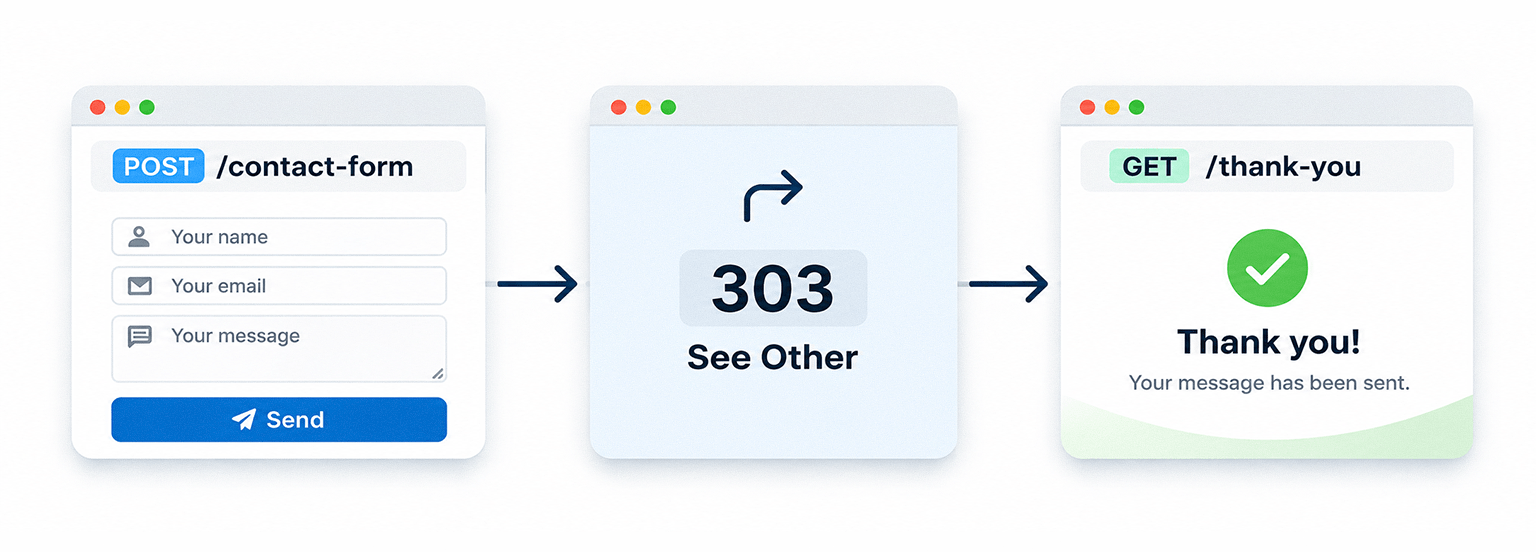
It is not the normal choice for transferring search signals from permanently moved webpages.
Not every old URL needs a replacement. If a page has been removed and there is no suitable alternative, the server should return an appropriate not-found response.
| Status | Meaning | Typical use |
|---|---|---|
| 404 Not Found | The requested resource cannot be found | Unknown, invalid or removed URLs |
| 410 Gone | The resource has been permanently removed | Content intentionally and permanently deleted |
A custom 404 page can help visitors find other relevant content. However, the server must still return HTTP 404.
A page that displays a not-found message but returns HTTP 200 can be identified as a soft 404.
Google recommends returning 404 or 410 when content has been removed and there is no relevant replacement.
A redirect and an internal rewrite are different operations.
| Operation | HTTP response | Browser URL changes? | Typical use |
|---|---|---|---|
| 301 redirect | 301 | Yes | Permanent page migration |
| 302 redirect | 302 | Yes | Temporary page move |
| 308 redirect | 308 | Yes | Permanent move preserving request method |
| 307 redirect | 307 | Yes | Temporary move preserving request method |
| 200 rewrite | Usually 200 | No | Internal routing and SPA fallback |
| Client-side navigation | Usually no redirect response | Yes | Application navigation |
For example, a Netlify rewrite can serve /index.html when a visitor requests a nested application route while leaving the requested URL unchanged.
This is useful for application routing, but it does not communicate that a previously indexed URL has moved permanently.
Netlify’s documentation explicitly identifies 200 rules as rewrites and explains that its SPA fallback can serve index.html for any requested URL.
Sources:
A redirect chain occurs when one URL redirects to an intermediate URL before reaching the final destination.
Example:
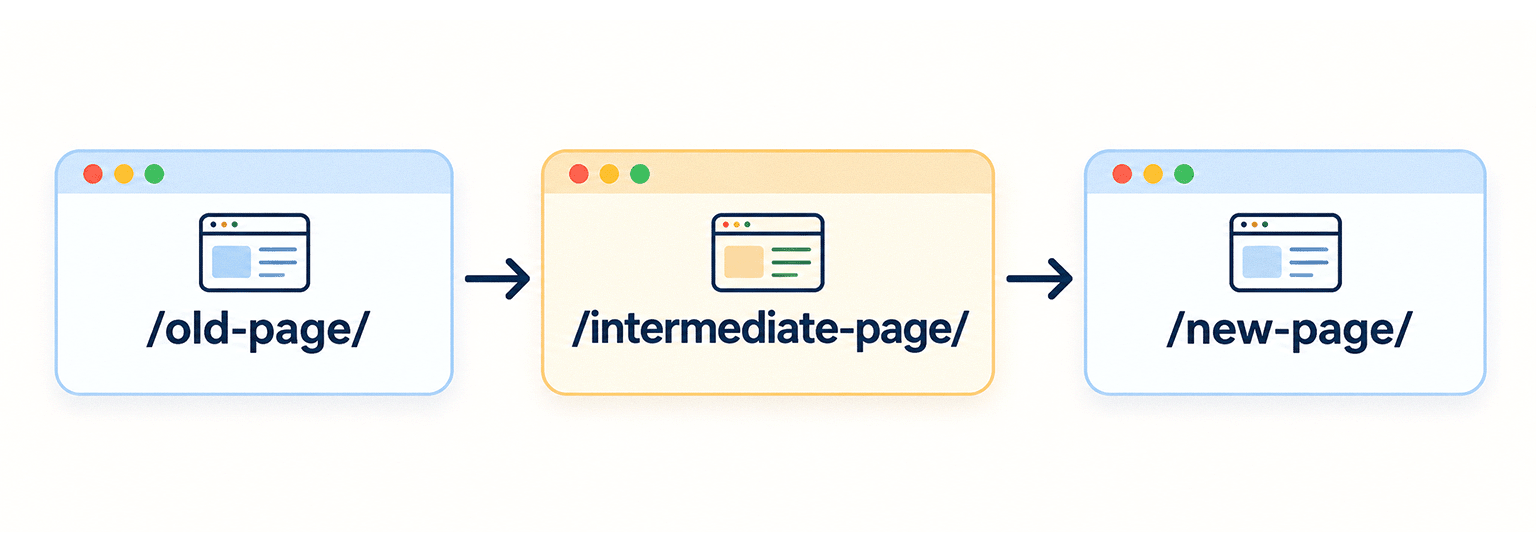
A better implementation redirects the original URL directly to /new-page/.
Google states that Googlebot can follow up to ten redirects in a chain, but recommends going directly to the final destination. If this is not possible, Google advises keeping the chain short, ideally no more than three hops and fewer than five.
Redirect chains add latency and are not handled consistently by every browser or user agent.
Google also warns against sending unrelated old URLs to a single homepage destination. Redirects should lead to the relevant replacement, not simply to a page that happens to exist.
Redirects can be implemented at several levels of a website’s architecture.
The appropriate method depends on the hosting environment, application framework, number of rules and available access to server configuration.
For WordPress websites, a redirect plugin provides an administrative interface for managing URL changes without directly editing server configuration.
Rank Math includes a Redirections module that supports permanent redirects, temporary redirects and other response codes.
To configure a redirect using Rank Math:
For example:
| Setting | Value |
|---|---|
| Source URL | /old-service/ |
| Destination URL | /services/web-development/ |
| Redirection type | 301 Permanent Move |
| Status | Active |
The plugin manages the redirect through WordPress.
Source: Rank Math: Setting Up Redirections.
A WordPress plugin is useful when:
There are limitations. A plugin-managed redirect depends on WordPress executing its request-handling process. Server-level redirects can be processed before WordPress loads.
For large migrations with thousands of rules, server configuration or a CDN redirect system may be easier to manage.
Avoid duplicating rules across Rank Math, .htaccess, Nginx and CDN configurations. Conflicting rules can cause redirect loops, unexpected destinations or unnecessary redirect hops.
.htaccessApache supports redirects through its mod_alias and mod_rewrite modules.
The .htaccess file allows certain server rules to be configured at directory level without editing the main Apache configuration.
For the following examples, assume that .htaccess is located in the website’s document root.
<IfModule mod_rewrite.c>
    RewriteEngine On

    RewriteRule ^old-page/?$ https://www.example.com/new-page/ [R=301,L]
</IfModule>
This rule redirects both:
https://www.example.com/old-page
https://www.example.com/old-page/
to:
https://www.example.com/new-page/The R=301 flag specifies a permanent redirect. The L flag stops processing the current ruleset pass.
Suppose the old domain is old-example.com and the new domain is new-example.com.
The following rule preserves the requested path:
<IfModule mod_rewrite.c>
    RewriteEngine On

    RewriteCond %{HTTP_HOST} ^(www\.)?old-example\.com$ [NC]

    RewriteRule ^ https://www.new-example.com%{REQUEST_URI} [R=301,L]
</IfModule>
For example:
https://old-example.com/about-us/becomes:
https://www.new-example.com/about-us/The original query string is retained because the substitution does not explicitly replace it.
HTTPS requirement: This .htaccess rule only runs after Apache has received and decrypted the request. The old HTTPS hostname must still resolve to a server with a valid certificate for that hostname. Otherwise, the TLS connection can fail before the redirect is returned.
Suppose a website changes its blog directory from /blog/ to /insights/.
<IfModule mod_rewrite.c>
    RewriteEngine On

    RewriteRule ^blog/(.*)$ /insights/$1 [R=301,L]
</IfModule>
This maps the original path to the new directory while preserving the remaining path.
For example:
/blog/website-migration/becomes:
/insights/website-migration/Check the mapping before using broad pattern-based rules. Not every old path necessarily has a corresponding destination.
mod_rewrite is enabled..htaccess overrides. Rewrite directives require AllowOverride FileInfo or an equivalent permission.Options -MultiViews directive requires permission to use Options. If it is not allowed, configure it in the virtual host instead.Apache’s documentation explains the differences between server-level and per-directory rewrite processing. In .htaccess, [L] stops the current pass, but Apache may process the rules again after an internal rewrite. The [END] flag in Apache 2.4 can stop further per-directory rewrite processing.
Sources:
Nginx does not use .htaccess files. Redirects are normally configured in Nginx server blocks and locations using directives such as return and rewrite. For straightforward redirects, return is usually the clearest option.
server {
    listen 443 ssl;
    server_name www.example.com;

    ssl_certificate /path/to/certificate.pem;
    ssl_certificate_key /path/to/private-key.pem;

    location = /old-page/ {
        return 301 /new-page/;
    }
}
This example redirects requests for /old-page/ to /new-page/ on the same hostname. The corresponding HTTP server configuration must also be considered if the website accepts HTTP requests.
For a domain migration, configure the old domain to redirect requests to the new hostname. The following example includes separate HTTP and HTTPS server blocks:
server {
    listen 80;
    server_name old-example.com www.old-example.com;

    return 301 https://www.new-example.com$request_uri;
}

server {
    listen 443 ssl;
    server_name old-example.com www.old-example.com;

    ssl_certificate /path/to/old-domain-certificate.pem;
    ssl_certificate_key /path/to/old-domain-private-key.pem;

    return 301 https://www.new-example.com$request_uri;
}
The HTTPS configuration requires a valid certificate for the old hostname. TLS negotiation takes place before Nginx can return an HTTP redirect. The $request_uri variable preserves the original path and query string.
For example:
http://old-example.com/services/web-design/?ref=campaignbecomes:
https://www.new-example.com/services/web-design/?ref=campaignTo change the /blog/ directory to /insights/, use a regular-expression location:
server {
    listen 443 ssl;
    server_name example.com;

    location ~ ^/blog/(.*)$ {
        return 301 /insights/$1$is_args$args;
    }
}
This maps the old path to the new directory and preserves the query string.
For example:
/blog/website-migration/?source=archivebecomes:
/insights/website-migration/?source=archiveTest these rules with the existing Nginx location configuration. Other regular-expression locations may affect which rule handles a request.
Validate the configuration before reloading the service:
sudo nginx -tIf the configuration passes:
sudo systemctl reload nginxThe reload command depends on the operating system and Nginx installation method.
Official documentation:
Static hosting platforms often provide their own redirect and rewrite systems. These are useful when the hosting environment does not provide direct access to Apache or Nginx. Examples include Netlify, Vercel and Cloudflare.
Netlify supports redirect and rewrite rules through a _redirects file or netlify.toml.
A permanent redirect can be configured as follows:
/old-page/  /new-page/  301
/old-blog/* /insights/:splat 301
A single-page application commonly requires a fallback rule:
/* /index.html 200This is a rewrite, not a permanent redirect. Netlify serves the application’s index.html while retaining the original requested URL.
Rule order matters. Netlify processes the first matching rule from top to bottom. Rules in the _redirects file are processed before rules in netlify.toml.
The SPA fallback should therefore appear after specific migration redirects. Otherwise, the catch-all rule can handle a request before the intended redirect is reached.
There is another important limitation. The catch-all fallback serves index.html for URLs that do not match a file, even when the requested application route does not exist.
A JavaScript router can display a not-found component, but that alone does not make the HTTP response a genuine 404. If the server returns HTTP 200, the application needs an additional strategy to prevent soft 404s.
Netlify’s documentation confirms this behaviour and the rule-processing order.
Sources:
Next.js provides redirect and rewrite functionality through project configuration.
As explained earlier, permanent: true generates a 308 response, while permanent: false generates a 307 response.
These rules are appropriate for incoming requests handled by the Next.js deployment. They should not be confused with client-side navigation.
For projects deployed as static exports or through different runtime configurations, verify the available redirect mechanisms with the hosting platform.
Sources:
Cloudflare provides Single Redirects and Bulk Redirects through its Rules system.
These can handle individual URL changes, wildcard patterns and larger redirect lists at the CDN edge.
They can be useful when:
Cloudflare redirects are configured independently of WordPress plugins, Apache rules and application routers. Avoid implementing the same redirect repeatedly at multiple layers.
Source: Cloudflare: Redirects.
Use the following comparison when selecting an implementation method.
| Method | Best suited for | Main consideration |
|---|---|---|
| WordPress redirect plugin | Smaller migrations managed through WordPress | Requires the CMS to handle requests |
Apache .htaccess | Apache hosting environments | Depends on mod_rewrite and override permissions |
| Nginx configuration | VPS and dedicated server environments | Requires server configuration access |
| Next.js redirects | Next.js applications | Produces 307 or 308 based on the configuration |
| Netlify redirects | Netlify-hosted websites | Rule order and catch-all rewrites require attention |
| Cloudflare Redirects | CDN-level and large redirect mappings | Requires appropriate Cloudflare configuration |
For a small WordPress migration, a redirect plugin may be sufficient. For a complete domain migration or a large URL mapping, server-level or CDN redirects are generally easier to manage and test centrally.
Correct redirect configuration is only one part of a website migration. The new website must also communicate consistent information about its URLs, content, languages and indexing preferences.
Check canonical link annotations on the new website.
For example:
<link
  rel="canonical"
  href="https://www.example.com/new-page/"
>
A page that has permanently moved should not continue referencing its previous URL through its canonical annotation. Google treats redirects and rel="canonical" annotations as strong canonicalization signals. Sitemap inclusion is a weaker signal.
These signals should be consistent. Do not submit a new URL in the sitemap while the page’s canonical tag points to an unrelated or old URL.
Internal links should point directly to the new destinations.
Review:
Avoid leaving internal links dependent on redirects.
The redirects may continue to work, but direct links reduce unnecessary requests and simplify future maintenance.
Multilingual websites require additional attention.
For example, an English and Slovak website may use separate URL prefixes:
/en-gb/services/
/sk-sk/sluzby/
If the domain or URL structure changes, all relevant hreflang annotations must point to the new language URLs.
Example:
<link
  rel="alternate"
  hreflang="en-GB"
  href="https://www.example.com/en-gb/services/"
>

<link
  rel="alternate"
  hreflang="sk-SK"
  href="https://www.example.com/sk-sk/sluzby/"
>
Each localized page should normally use its own language-specific canonical URL.
The language alternatives should also reference the corresponding versions on the new website. Do not redirect every language version to one language’s homepage or a generic landing page.
Source: Google: Site Moves with URL Changes.
Structured data may contain URLs that belong to the previous website.
Review properties that reference your own site, including:
url.@id.image.logo.mainEntityOfPage.For example, an Organization schema should not continue referencing an outdated website address or logo location.
Product, breadcrumb and article structured data should also reflect the new URLs.
External profile URLs in properties such as sameAs should not be changed unless those external references have actually changed.
Generate a new XML sitemap containing the preferred URLs of the migrated website.
Remove obsolete URLs that have been permanently redirected.
Check that:
Submit the new sitemap through Google Search Console.
Google recommends submitting the new sitemap after a URL migration. Once Google has processed the new URLs, the old sitemap can be removed.
Source: Google: Site Moves with URL Changes.
The production website must be accessible to search engine crawlers.
Check that:
noindex directives have been removed.Do not block old URLs through robots.txt when those URLs need to return redirect responses. Search engines must be able to request the old URLs to discover their redirects.
A migration should follow a controlled launch process.
The new website should be tested before production traffic is switched to it.
Complete the following tasks:
If the domain is changing, retain control of the old domain. Its DNS and HTTPS configuration must remain available so old URLs can return redirects.
The launch process depends on the migration type.
For a hosting migration that preserves URLs:
Google recommends monitoring both environments before shutting down the old hosting.
For a domain or URL migration:
The Change of Address tool is intended for moving a website from one domain or subdomain to another.
Examples include:
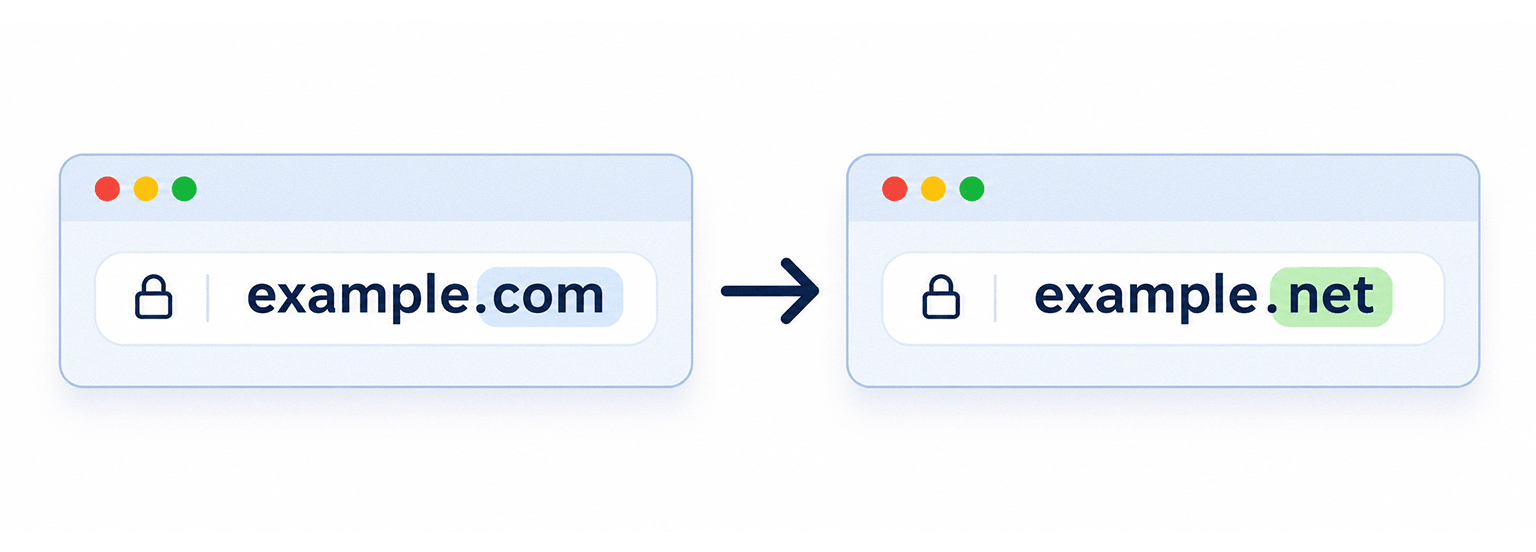
or:

It is not required for:
www and non-www on the same domain.These changes should still use the appropriate redirects and sitemap updates.
If the migration is a domain change, verify the required old and new Search Console properties and submit the Change of Address request after the redirects are active.
A redirect should not be judged only by whether a browser eventually displays the correct page.
Check the HTTP response and destination.
For example:
curl -I https://example.com/old-page/A permanent redirect should return a response similar to:
HTTP/1.1 301 Moved Permanently
Location: https://example.com/new-page/
To follow the redirect and inspect the final response:
curl -IL https://example.com/old-page/For larger migrations, automate the checks using the URL mapping file and a testing script.
The script should verify:
Do not test only a handful of important pages. Include representative URLs from every migrated section and all redirect patterns.
For CMS and static websites, test all major page types.
For Vue and React applications, also test:
For a single-page application, verify that a valid route returns the application entry document while an invalid route does not silently become a successful page containing no meaningful content.
Google explains this problem in JavaScript SEO Basics.
These problems can affect visitors, search engine crawling, indexing and business operations.
| Mistake | Potential consequence |
|---|---|
| Migrating files without the database | Missing content or broken functionality |
| Migrating the database without media files | Broken images and downloads |
| Changing URLs without redirect mapping | Old pages return 404 |
| Redirecting unrelated URLs to the homepage | Irrelevant destinations and potential soft 404s |
| Using 302 for a permanent move | Search engines receive a temporary redirect signal |
| Creating long redirect chains | Additional latency and unnecessary requests |
| Incorrect SPA fallback | Nested routes return 404 or nonexistent routes return soft 404s |
| Leaving old canonical URLs | Conflicting canonicalization signals |
| Keeping outdated internal links | Unnecessary redirect requests |
| Leaving staging restrictions active | Search engines cannot properly access the new website |
| Using raw SQL on serialized WordPress data | Corrupted stored settings |
| Overwriting live e-commerce data with an old backup | Lost orders and inconsistent stock |
| Shutting down the old server too early | Users and crawlers may still depend on the original infrastructure |
Combining several major changes also makes a migration harder to diagnose. Google recommends changing major aspects of a website in stages where possible. For example, changing the domain, CMS and visual design simultaneously makes it harder to identify the cause of search or technical problems.
A website migration does not end when the new homepage becomes accessible. Search engines need to crawl the old and new URLs, process the redirects and update their indexes. Some temporary changes in search visibility are normal during this process.
Keep the old and new properties available during a domain migration.
Review:
Investigate unexpected changes in the Page Indexing report and use URL Inspection to verify individual pages.
Compare important pages before and after migration.
Useful metrics include:
Investigate declines alongside technical problems.
A reduction in organic traffic does not necessarily mean the redirects are incorrect. It can also result from missing content, rendering problems, slower responses, internal linking changes or incorrect indexing directives.
Server logs provide direct evidence of what visitors and crawlers are requesting.
Review requests to:
For a hosting migration, monitor traffic on both environments until the new server consistently serves requests correctly.
For a domain migration, check that important old URLs continue returning their intended permanent redirects.
Google recommends keeping permanent migration redirects for as long as possible, generally at least one year.
This period allows Google to recrawl the old URLs and process the new destinations. It also gives external websites time to update links pointing to the previous URLs.
From a user perspective, keeping relevant redirects indefinitely is often preferable when older links are still in use.
Google also notes that a small or medium-sized website may need several weeks for most URLs to be processed after a move. Larger websites can take longer.
There is no fixed period in which every website will return to its previous search performance.
Changing hosting does not automatically require URL changes or redirects. If the domain and public URLs remain the same, the main requirements are to make sure the new server returns the expected content and remains accessible to visitors and crawlers. Search visibility can still be affected if the new hosting environment introduces server errors, missing resources, slow responses or indexing restrictions.
Only when URLs change or when an old URL needs a permanent replacement. If the new CMS preserves the existing public URLs, those pages do not need redirects. If the new platform changes permalink structures, category paths or document locations, map the old URLs to their corresponding new destinations and configure permanent redirects.
Yes, provided that the migration preserves the information search engines and visitors depend on. This includes relevant content, URLs, metadata, structured data, internal links, media and canonical annotations. You must also decide how the React application renders its pages. Client-side rendering, server-side rendering and static generation have different technical requirements. If URLs change, use server-side or edge permanent redirects wherever possible.
A WordPress redirect plugin is convenient for individual redirects and smaller migrations. Apache, Nginx and CDN-level redirects offer more control over request handling and are generally preferable for large migrations or environments where the CMS may not be available. The correct choice depends on your hosting architecture, the number of redirects and the available server access.
Google supports client-side redirects as a fallback when server-side redirects cannot be implemented. However, server-side permanent redirects are preferable for URL migrations because they communicate the new location directly through the HTTP response. Do not confuse application navigation with an HTTP redirect.
.htaccess file?No. .htaccess is an Apache configuration mechanism, not a requirement of Vue or React. A Vue or React application needs appropriate hosting configuration for its routing architecture. Depending on the environment, this may be implemented through Apache, Nginx, a platform configuration file, a server runtime or a CDN.
Where possible, separate major changes. Google recommends handling significant migration changes in stages. Moving the domain first, then changing the CMS or redesigning the website, makes it easier to identify and correct problems.
There is no guarantee that rankings will remain identical after a major migration. Correctly planned migrations can preserve URLs, content and important search signals, but search engines still need time to process the changes. Temporary fluctuations may occur. The most important tasks are preserving relevant content, mapping URLs correctly, implementing suitable redirects and monitoring the new website.
Website migration requires coordination between the application, database, server infrastructure and SEO configuration.
The process should begin with a complete understanding of the existing website. Its URLs, content, media, database records, dependencies and search performance need to be documented before changes are introduced.
The migration method then depends on the architecture. WordPress requires careful database and file transfers. A static website requires correct deployment of generated files and hosting configuration. Vue and React applications also require appropriate routing, fallback behaviour and meaningful HTTP responses.
Permanent URL changes need appropriate redirects. These can be implemented through plugins, web server configuration, application frameworks or CDN platforms. The important requirement is that each relevant old URL leads directly to the correct replacement.
Search visibility is best protected through preparation, correct implementation and continuous verification. A website should not be considered fully migrated simply because the homepage loads on the new server. Its existing content, routes, resources and search engine signals must also work as intended.
Playful Sparkle has been engineering robust digital ecosystems since 2004. Our services include Web Development, SEO & Digital Marketing, and Application Development. A website migration can affect search visibility, content integrity, application functionality and business operations. We approach these projects by examining existing infrastructure, identifying technical dependencies and planning the transition before deployment. Whether you are moving a WordPress website, rebuilding an online store or replacing an existing platform with a custom application, our Web Development team can help plan and implement the migration. Explore our Web Development services or contact Playful Sparkle to discuss your project.



The article examines the Rust-based decoder behind renewed browser support, compares JPEG XL with JPEG, WebP and AVIF, and explains how to test CMS, image-processing, CDN and caching compatibility while retaining fallback formats.

NIS2 applicability in Slovakia depends on an organisation’s actual activities, company size and specific statutory inclusion criteria. Learn how to assess your regulatory status, notify the NBÚ, implement cybersecurity measures, report serious incidents and meet audit or self-assessment requirements.

Reddit discussions highlight common problems involving unclear creative briefs, revision limits, source-file delivery and production specifications. Learn how to evaluate design capabilities, define project deliverables and prevent scope misunderstandings before work begins.

